Prepare a driver salary payment record with the payer, driver, vehicle and pay period. Reconcile advances and agreed adjustments first, then enter the amount actually paid. State the month or dates covered, the agreed salary basis and any advance adjustment in a way the driver can understand. Keep payment evidence with the acknowledgement and check that the amount shown is the amount actually settled. This voucher provides a readable payment record; attendance, overtime and deductions need to be reconciled before the final figure is entered. Start with the driver salary receipt for a recorded payment.
The record and the example used here
The receipt records a payment, while an attendance sheet or wage calculation explains how it was determined. Keep those supporting records when pay depends on days worked, overtime or an advance.
Template 4 offers an editable voucher title and acknowledgement. The example uses payer Aarav Sample, driver Ravi Sample, vehicle MH12AB1234 and the period 1–30 September 2026. An agreed ₹20,000 amount less ₹2,000 advance and ₹500 adjustment leaves ₹17,500, paid on 30 September.
There is no separate advance, deduction or attendance calculator in this layout. The explanation is entered in Acknowledgement Text and the reconciled figure in Paid Amount.
How do you read a sample driver salary receipt?
A sample driver salary receipt shows how the payer, driver and paid amount form an acknowledgement. Replace the illustrative names and vehicle reference before preparing your own record. The format of driver salary receipt should also make the salary period understandable through its supported text fields. Compare the written amount with the figure and confirm that both describe the same payment.
Before you start: prepare and reconcile the details
Prepare a short pay calculation outside the voucher using the agreed salary, covered period and any supported overtime or adjustment. Explain an advance deduction to the driver and retain the earlier payment reference. The voucher should then acknowledge the amount being paid now, rather than hiding the reconciliation in a changed salary figure.
Review the payer and driver names independently. Include the vehicle reference only when it helps identify the employment or service arrangement. A decorative stamp or typed acknowledgement is not a substitute for the recipient actually confirming payment through the process you use. Keep the signed or otherwise accepted record with settlement evidence.
Fields and sample values
| Field | Purpose | Sample value | When it applies |
|---|---|---|---|
| Title / Subtitle | Identify the voucher and period. | ILLUSTRATIVE PAYROLL VOUCHER; Driver pay: September 2026 | Useful when a record may be viewed without its surrounding file. |
| Date | Payment date displayed on the voucher. | 30 September 2026 | Template 4 also derives its displayed salary month from this date. |
| Payer / Driver | Identify who paid and who received. | Aarav Sample; Ravi Sample | Names carry into the acknowledgement blocks. |
| Vehicle Number | Connect the payment record to the vehicle. | MH12AB1234 | A generated vehicle number is only a sample, not a registration lookup. |
| Paid Amount | Final amount received for this payment. | ₹17,500 | Calculate advances and deductions before entry. |
| Acknowledgement Text | Explain period, adjustments and payment mode. | ₹20,000 − ₹2,000 − ₹500; UPI | This text does not calculate or verify a payment. |
| Stamp Type | Choose the stamp display. | None for this sample | A decorative stamp image does not establish legal stamping or acknowledgement. |
Follow the editor step by step
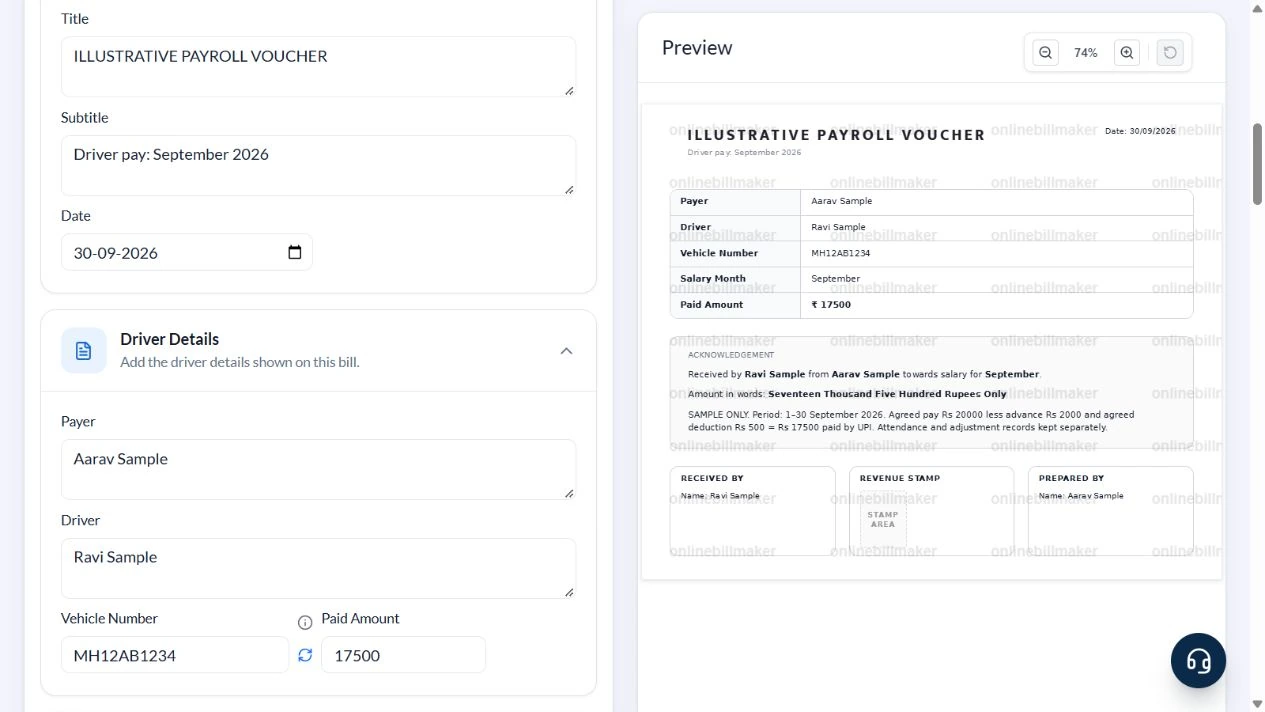
Work through these stages in order. The screenshots show the actual editor running on localhost with illustrative details. Open a screenshot at full size when you need to read a field label; compare the values with your own source record.
1. Select the editable payroll voucher
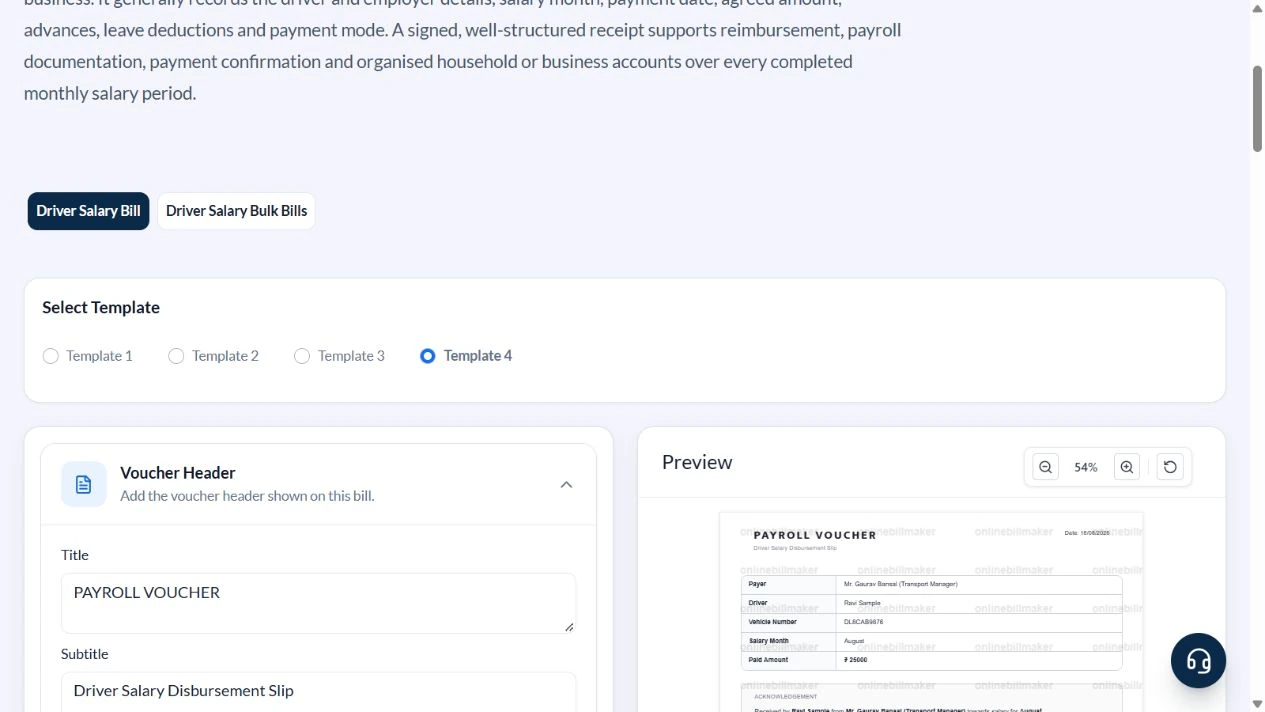
Open Driver Salary and select Template 4 from the four layouts. Voucher Header, Driver Details, Acknowledgement and Revenue Stamp are available for this layout.
2. Enter payer, driver and period
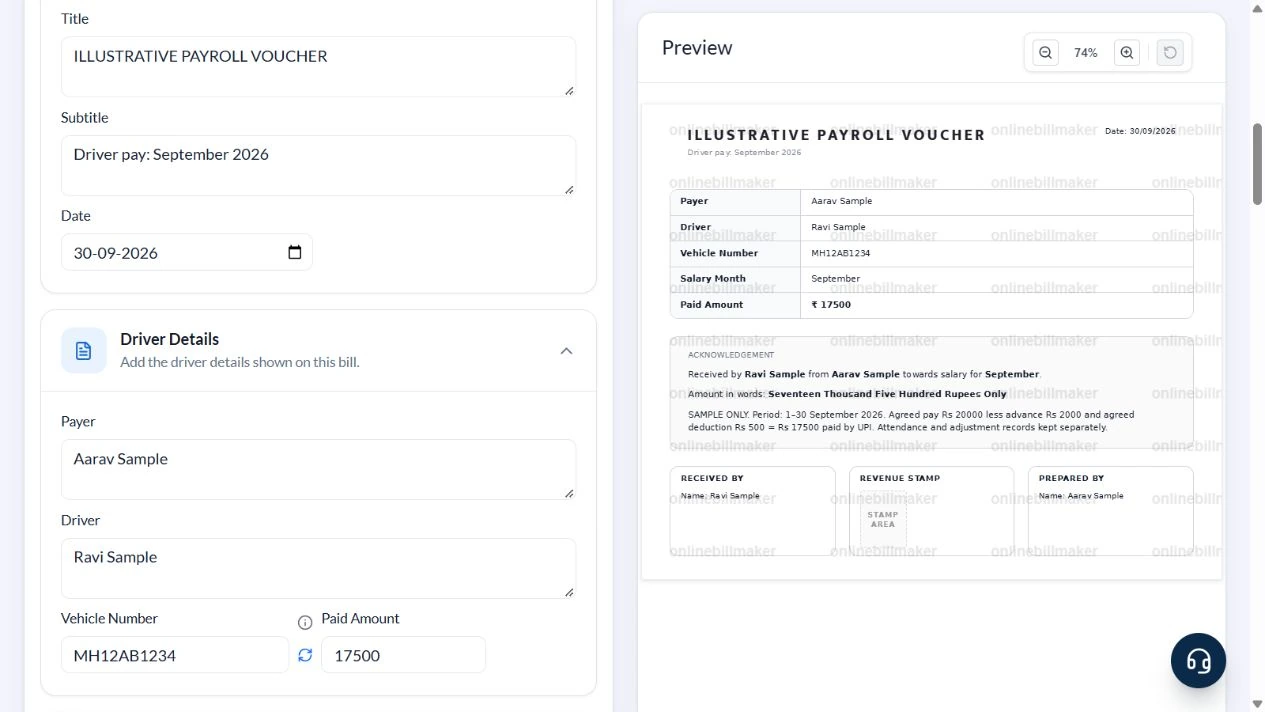
In Voucher Header enter ILLUSTRATIVE PAYROLL VOUCHER, subtitle Driver pay: September 2026 and date 30 September 2026. Under Driver Details enter Aarav Sample, Ravi Sample and MH12AB1234.
3. Enter the reconciled payment
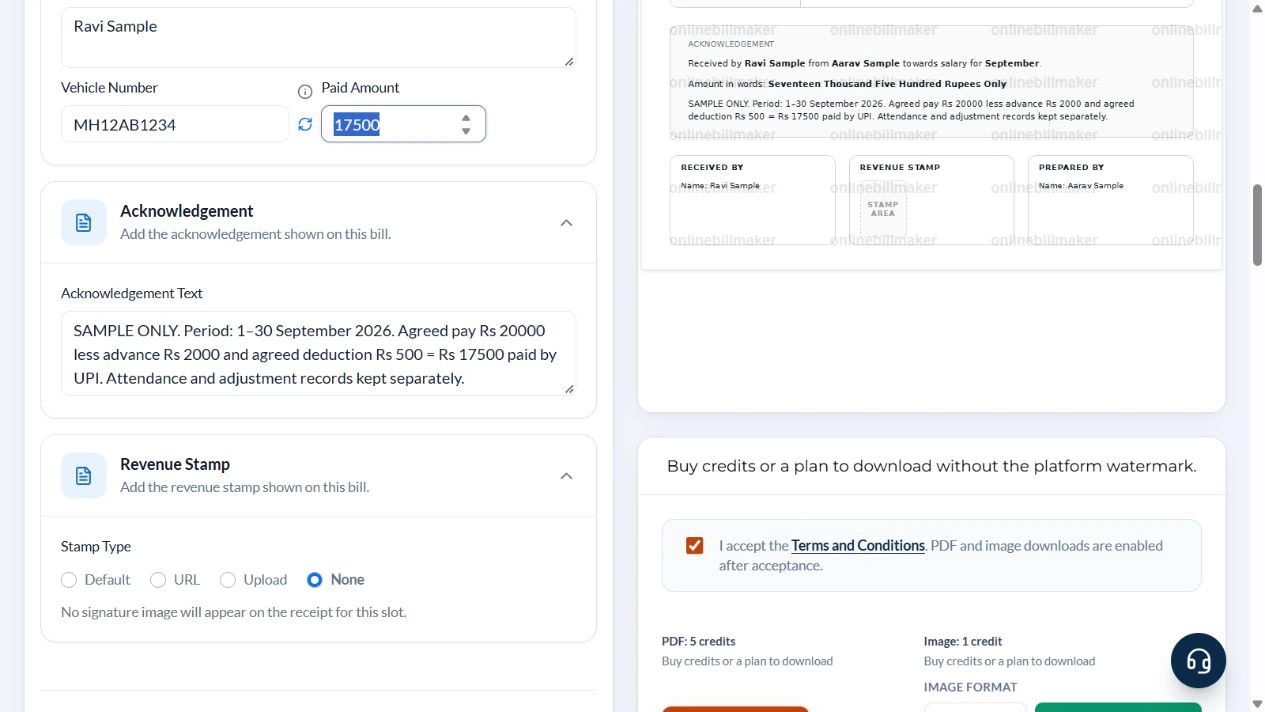
Calculate ₹20,000 less ₹2,000 advance and ₹500 agreed adjustment before filling Paid Amount with 17500. In Acknowledgement Text state SAMPLE ONLY, the exact period, each adjustment, UPI and that attendance evidence is kept separately. Set Stamp Type to None.
4. Check names, amount and acknowledgement
The preview shows September, ₹17,500 and Seventeen Thousand Five Hundred Rupees Only. Confirm the payer and driver names in Received By and Prepared By. Read the acknowledgement rather than leaving a default declaration that may not apply.
5. Review download choices
PDF and image controls show the current credit costs. This walkthrough inspected the output stage without buying access or opening an exported file.
After downloading: inspect the file before sharing
If you complete an eligible download, open the saved PDF or image and compare it with the preview. Check the first and last lines, long addresses, amounts, dates and any acknowledgement area. Confirm that every intended page is present and readable at the size the recipient will use. Keep the source record and payment evidence with the final file so the document can be reconciled later.
If you spot an error, return to the editor and correct the source field before generating the replacement. Use a clear file name with the document reference and period so an older draft is not accidentally sent as the final copy.
From ₹20,000 agreed pay to ₹17,500 paid
| Item | Basis | Result |
|---|---|---|
| Agreed pay | For 1–30 September 2026 | ₹20,000 |
| Advance adjustment | Already paid; deduct once | −₹2,000 |
| Other agreed adjustment | Supported separately | −₹500 |
| Paid Amount | ₹20,000 − ₹2,000 − ₹500 | ₹17,500 |
No attendance deduction rate is assumed. If the agreement requires prorating, calculate it against the actual attendance and agreed basis before preparing the receipt. Record earlier advances separately to avoid counting the same payment twice.
Can the receipt determine income-tax treatment?
A driver salary receipt for income tax records information that may be reviewed with other evidence. It does not decide whether an allowance, reimbursement or arrangement receives a particular tax treatment. Check the applicable rules and employer process before using the copy in a claim. A driver salary receipt format for income tax should therefore be treated as a documentation question, not a promise of exemption.
How do you keep recurring salary records consistent?
When you create a driver salary receipt each month, keep the payer and recipient details consistent but update the payment date and period accurately. A monthly driver salary receipt should not inherit the previous amount without checking it. Keep cash acknowledgements with the recipient’s confirmation, and retain the transaction evidence for electronic payments. If you correct an entry, arrange a reviewed replacement rather than silently changing an acknowledged record.
Troubleshooting and final checks
- Do not put gross agreed pay in Paid Amount when less was actually paid.
- Check the month derived from the payment date; for payment relating to an earlier period, state that period prominently and choose a suitable layout.
- Replace the default official-use declaration if it does not describe the real arrangement.
- A displayed signature or stamp is not evidence that the driver acknowledged payment.
Editing and previewing are free. Downloads require sign-in and either an active plan or enough purchased credits: 5 credits for a PDF and 1 credit for an image. There are no free download credits. Free users see the platform watermark in the preview. Signed-in users with a credit balance or an active plan can choose a download format and preview without the watermark. Compare download credits and plans.
The receipt does not verify employment, attendance, payment or reimbursement eligibility.