Prepare an internal cash payment voucher with a clear payee and purpose for every amount. Keep supporting receipts and obtain the actual acknowledgement through your organisation’s process. Enter the voucher reference, date, recipient and purpose, then add the supported amount for each expense line. Compare the total with the amount in words and complete the preparation, checking and approval details through your actual process. The voucher should help reconcile a cash payment to its supporting evidence without being mistaken for the supplier’s original invoice. Start with the cash voucher generator for itemised payments.
The record and the example used here
A payment voucher records money going out; a receipt voucher records money coming in. The demonstrated layout says Paid To, so it is an outgoing payment record. Changing the title alone does not reverse that meaning.
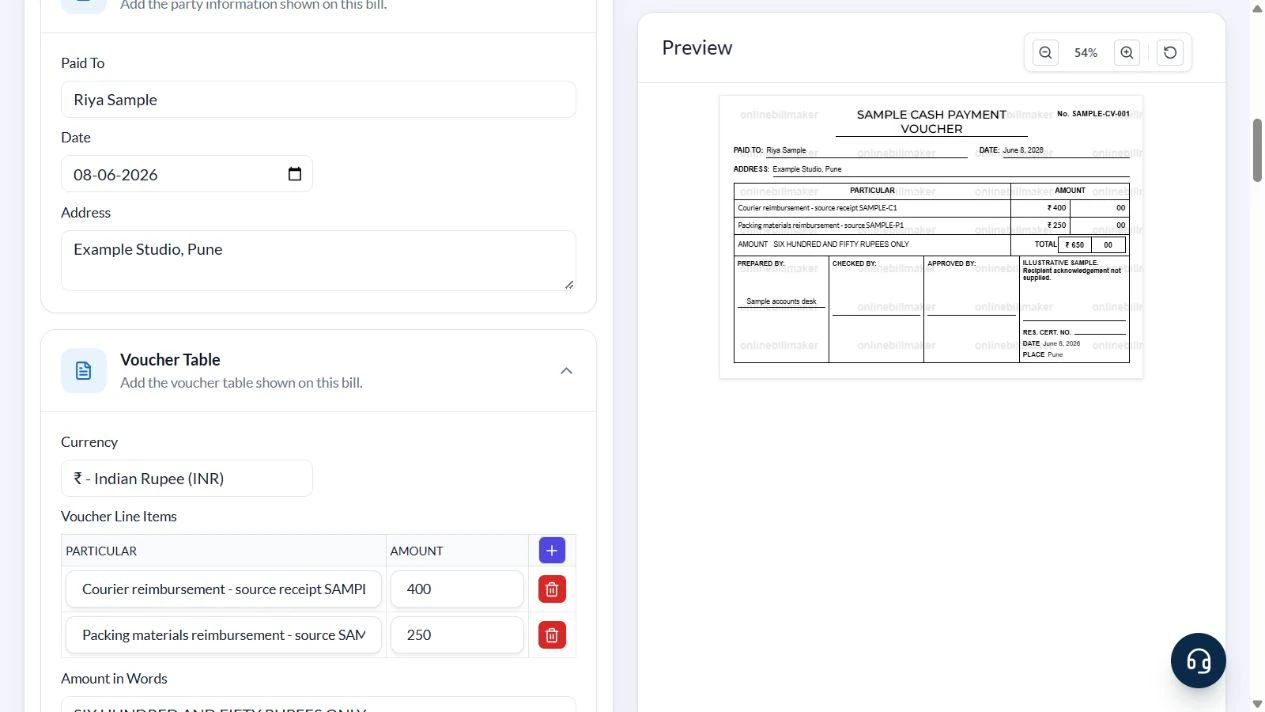
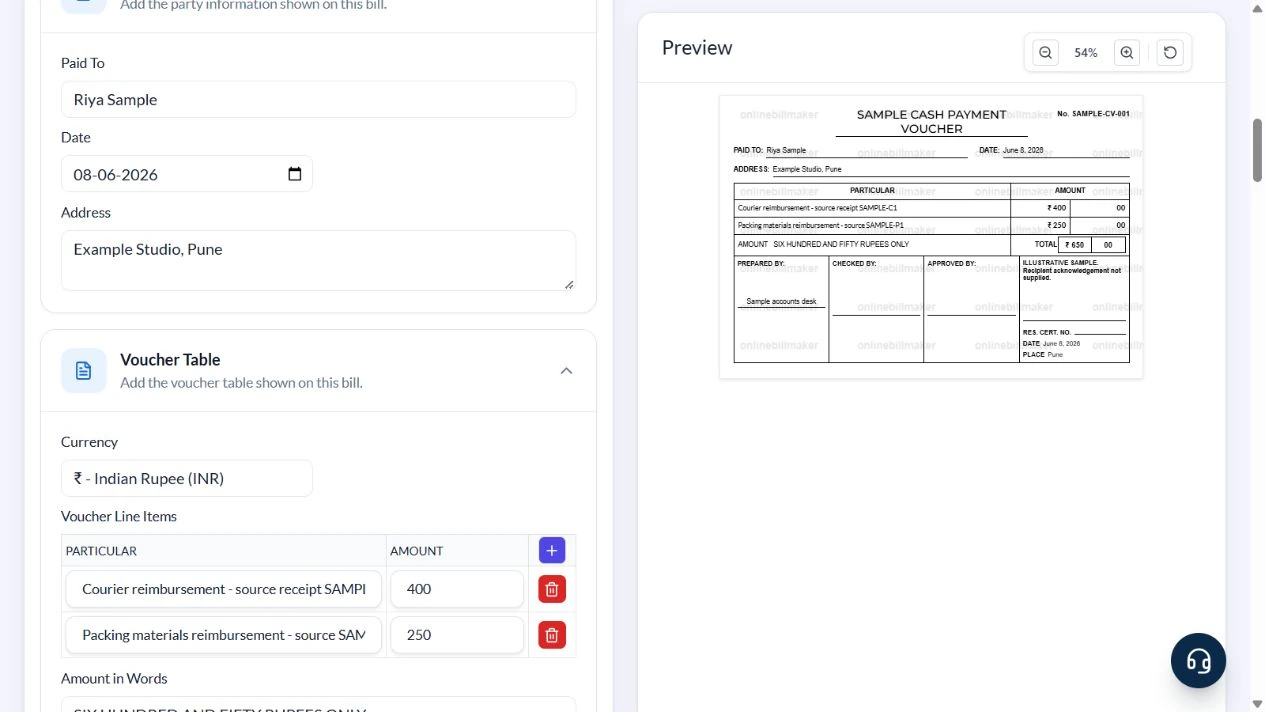
Template 1 of three layouts is used for an illustrative payment to Riya Sample at Example Studio, Pune on 8 June 2026. Reference SAMPLE-CV-001 covers ₹400 courier reimbursement and ₹250 packing-material reimbursement, total ₹650.
The sample clears all four signature images and leaves Checked By and Approved By blank. Names or pasted images do not prove that a reviewer approved a payment.
How do you read an example of a cash voucher?
An example of cash voucher preparation should make the payee, purpose and amount easy to trace. In a petty cash voucher sample format, compare every line with its supporting receipt and confirm whether the voucher covers one expense or several. A cash voucher book reference can help organise the records, but the number itself does not prove that the transaction was approved or paid.
Before you start: prepare and reconcile the details
Start with the payment being authorised or acknowledged, not just a desired total. Identify the payee and explain each expense in terms a reviewer can understand. Attach or reference supporting receipts and distinguish an advance from reimbursement of an expense already paid.
Reconcile voucher totals with the cash ledger and actual handover. Prepared By, Checked By and Approved By are separate responsibilities; typing a name does not establish that the person reviewed the payment. Keep the real approval and acknowledgement evidence, and use a unique voucher reference so the same cash movement is not recorded twice.
Fields and sample values
| Field | Purpose | Sample value | When it applies |
|---|---|---|---|
| Voucher Title / Voucher Number | Describe and reference the payment. | SAMPLE CASH PAYMENT VOUCHER; SAMPLE-CV-001 | Use a distinct reference for each transaction. |
| Paid To / Address / Date | Identify the recipient and payment date. | Riya Sample; Example Studio, Pune; 8 June 2026 | This field means recipient, not payer. |
| Particular / Amount | Explain each expense. | Courier reimbursement ₹400; packing ₹250 | Reference the supporting receipt in the description. |
| Amount in Words | Display the total as words. | SIX HUNDRED AND FIFTY RUPEES ONLY | The wording follows the summed amounts. |
| Prepared By / Checked By / Approved By | Record separate responsibilities. | Sample accounts desk; other roles blank | Populate only actual completed roles. |
| Received Text / signature images | Provide an acknowledgement area. | Recipient acknowledgement not supplied | The sample leaves every signature image blank. |
| Res. Cert. No. / Certificate Date / Place | Optional acknowledgement particulars. | Number blank; 8 June 2026; Pune | Do not invent a certificate number. |
Follow the editor step by step
Work through these stages in order. The screenshots show the actual editor running on localhost with illustrative details. Open a screenshot at full size when you need to read a field label; compare the values with your own source record.
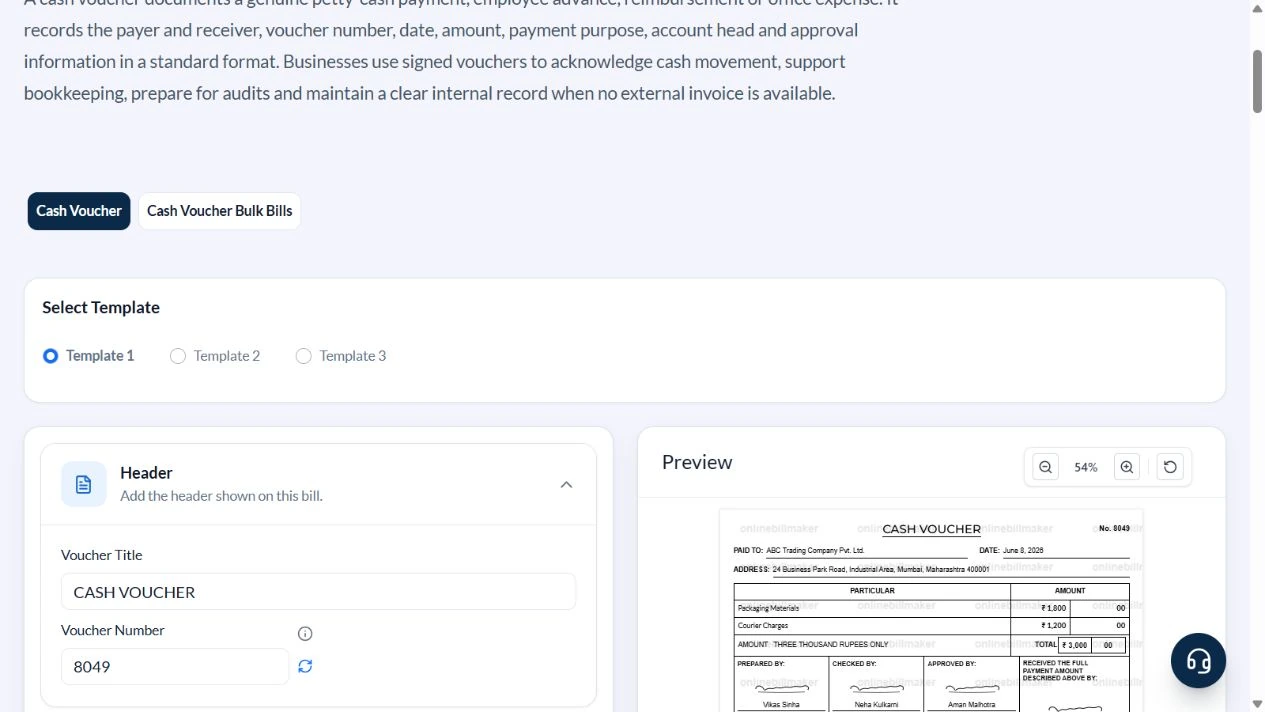
1. Choose an outgoing cash-payment layout
Select Template 1. Confirm that its party label says Paid To before treating it as a payment voucher.
2. Identify this payment
Use SAMPLE CASH PAYMENT VOUCHER, reference SAMPLE-CV-001, Paid To Riya Sample and Address Example Studio, Pune. The example Date and Certificate Date are both 8 June 2026.
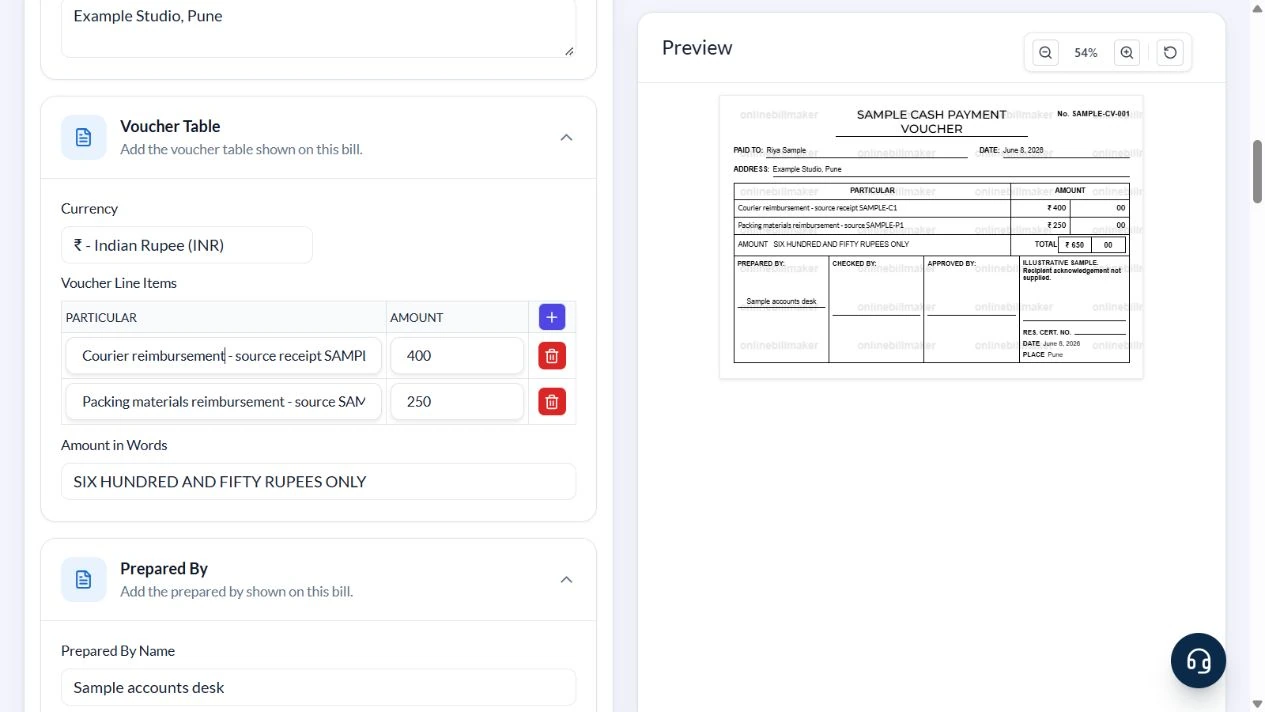
3. Link each amount to its purpose
In Voucher Line Items enter Courier reimbursement – source receipt SAMPLE-C1 with 400 and Packing materials reimbursement – source SAMPLE-P1 with 250. Confirm a ₹650 total and matching amount in words.
4. Leave unperformed approvals blank
Set Prepared By Name to Sample accounts desk. Clear Checked By Name, Approved By Name, Res. Cert. No. and all four Post Image/Stamp URLs. Use ILLUSTRATIVE SAMPLE. Recipient acknowledgement not supplied. in Received Text and Pune in Place.
5. Inspect output access
Review the PDF and image controls after checking the payment direction and amounts. No access purchase or exported-file inspection was performed.
After downloading: inspect the file before sharing
If you complete an eligible download, open the saved PDF or image and compare it with the preview. Check the first and last lines, long addresses, amounts, dates and any acknowledgement area. Confirm that every intended page is present and readable at the size the recipient will use. Keep the source record and payment evidence with the final file so the document can be reconciled later.
If you spot an error, return to the editor and correct the source field before generating the replacement. Use a clear file name with the document reference and period so an older draft is not accidentally sent as the final copy.
Two reimbursements, ₹650 cash paid
| Item | Basis | Result |
|---|---|---|
| Courier expense | Source receipt SAMPLE-C1 | ₹400 |
| Packing materials | Source record SAMPLE-P1 | ₹250 |
| Payment voucher total | ₹400 + ₹250 | ₹650 |
| Words | Calculated from the total | Six hundred and fifty rupees only |
The voucher records the internal payment. It does not replace the supplier’s invoice or establish the underlying expense by itself. Reconcile the cash book and keep the original supporting records.
How do you distinguish receipts from payments?
A cash received voucher format acknowledges an inflow, while a cash disbursement voucher sample describes an outflow. Check the title and acknowledgement wording before entering the recipient and amount. For a cash purchase voucher format, retain the seller’s supporting bill as well as the internal approval. Do not treat an internal voucher as a substitute for every external document the transaction requires.
How do you reconcile petty cash records?
Petty cash slips are useful only when they can be matched to the cash record and supporting evidence. Review the voucher total, date and reference before filing, and account for any returned advance through the appropriate process. A cash voucher and petty cash voucher share the need for a clear purpose and acknowledgement. Keep corrections distinguishable so the same expense is not entered twice.
Troubleshooting and final checks
- Do not put the payer in Paid To.
- Do not turn a payment voucher into an incoming receipt merely by renaming it.
- Remove default signatures and approval names that do not apply.
- Avoid vague particulars such as general expenses when the underlying costs are known.
Editing and previewing are free. Downloads require sign-in and either an active plan or enough purchased credits: 5 credits for a PDF and 1 credit for an image. There are no free download credits. Free users see the platform watermark in the preview. Signed-in users with a credit balance or an active plan can choose a download format and preview without the watermark. Compare download credits and plans.
The voucher does not move money, authorise an expense or authenticate a signature.