Create a cab expense record with the journey route, timing and a clear fare breakdown. Use the actual trip receipt as the source; distance alone does not determine the entered fare. Enter pickup and drop locations, journey date, vehicle and fare components from the trip record. Keep the base trip amount, convenience fee, airport charge and any supported tax fields consistent with the source. Review the full breakdown before downloading so a later expense check can distinguish the route travelled from the amount charged. Start with the cab bill generator for trip and fare records.
The record and the example used here
A useful cab record lets a reviewer match the travel date, pickup and drop to a payment. Identify separately what was charged for the ride and what was charged for a toll, convenience fee or airport service.
Template 1 of four layouts is demonstrated with Aarav Sample – DEMO, driver Ravi Sample and sample vehicle MH12AB1234. On 18 August 2026, the route runs from Example Station, Pune at 20:41 to Example Residency, Pune at 22:41. Distance is 20 kilometres.
The example enters ₹1,000 Trip Amount, ₹50 Convenience Fee and zero Airport Charge. Total is ₹1,050. A 5% rate is used only to demonstrate the layout’s inclusive-tax arithmetic; it is not a universal cab tax rate.
How do you check a sample taxi bill?
In a sample taxi bill, identify the route and trip amount first, then look for separate charges. A taxi invoice sample should let you follow those components to the final figure without counting a fee twice. Compare the passenger name and vehicle reference with the journey record. The amounts in this walkthrough illustrate the form, so replace them with your own supported figures before preparing a final copy.
Before you start: prepare and reconcile the details
Check whether the amount provided by the driver or operator includes waiting, tolls, parking or airport charges. The distance field describes the journey; it should not be treated as a tariff calculation unless the selected layout explicitly provides one. Record the fare agreed or billed for the actual journey.
If a journey crosses midnight, compare the departure and arrival information carefully. A dropped day or reversed time can make the trip appear shorter than it was. Match any additional charges with supporting evidence and avoid entering an included airport fee again. Keep the operator’s original receipt with the formatted expense copy.
Fields and sample values
| Field | Purpose | Sample value | When it applies |
|---|---|---|---|
| Date / Pickup Time / Drop Time | Identify when the journey happened. | 18 August 2026; 20:41–22:41 | Times do not calculate a waiting charge. |
| Pickup Address / Drop Address | Describe the actual route. | Example Station to Example Residency, Pune | Avoid unnecessary precise personal addresses in samples. |
| Customer / Driver / Vehicle | Connect the trip and receipt. | Aarav Sample; Ravi Sample; MH12AB1234 | A typed registration is not vehicle verification. |
| Distance / Unit | Describe distance travelled. | 20 Kilometers | Distance does not multiply a per-kilometre rate in this layout. |
| Trip Amount | Enter the base trip charge from the source record. | ₹1,000 | The form does not calculate a meter tariff. |
| Convenience Fee / Airport Charge | Add supported charges. | ₹50; ₹0 | Convenience Fee prints as Toll Convenience Fee. Explain its meaning accurately. |
| Tax % | Extract included tax from the total. | 5% assumed for this example | ₹1,050 × 5 ÷ 105 = ₹50. |
| Registration Type / Registration Number / Payment Method | Label the payment reference. | TXN NO; SAMPLE-CAB-001; UPI | This is a local record, not a platform transaction lookup. |
Follow the editor step by step
Work through these stages in order. The screenshots show the actual editor running on localhost with illustrative details. Open a screenshot at full size when you need to read a field label; compare the values with your own source record.
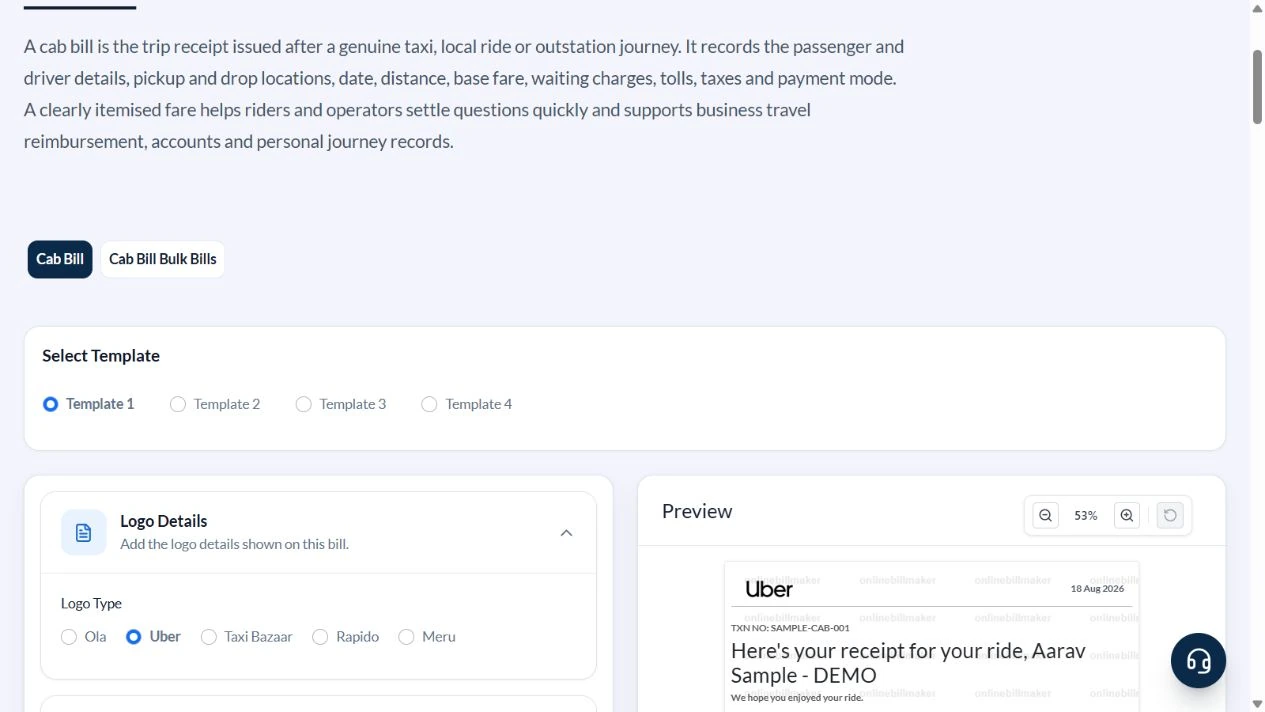
1. Choose Template 1
Select Template 1 before filling the trip. The available provider logo choices are independent design options; they do not connect the form to a ride-hailing account.
2. Enter the journey and participants
Use Aarav Sample – DEMO, Ravi Sample, MH12AB1234 and Sample sedan. Set the sample date to 18 August 2026. Enter Example Station, Pune at 20:41 and Example Residency, Pune at 22:41. Set Distance to 20 Kilometers.
3. Enter fare components and payment reference
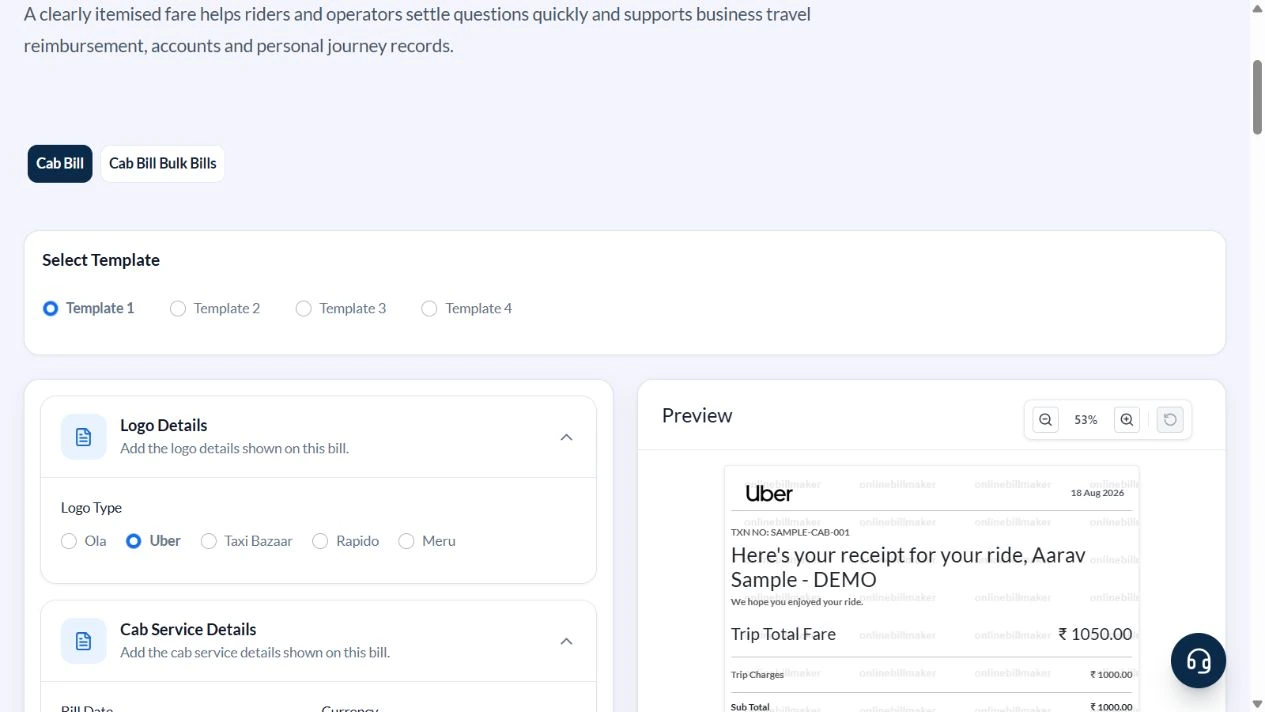
Set Trip Amount to 1000, Convenience Fee to 50, Airport Charge to zero and Tax % to 5 for the arithmetic illustration. Choose UPI, Registration Type TXN NO and SAMPLE-CAB-001.
4. Read the included-tax amount
The preview total is ₹1,050, including ₹50 GST under the sample assumption. Check that the ₹50 fee is added once and the ₹50 included tax is not added again. Confirm the route, driver and transaction label.
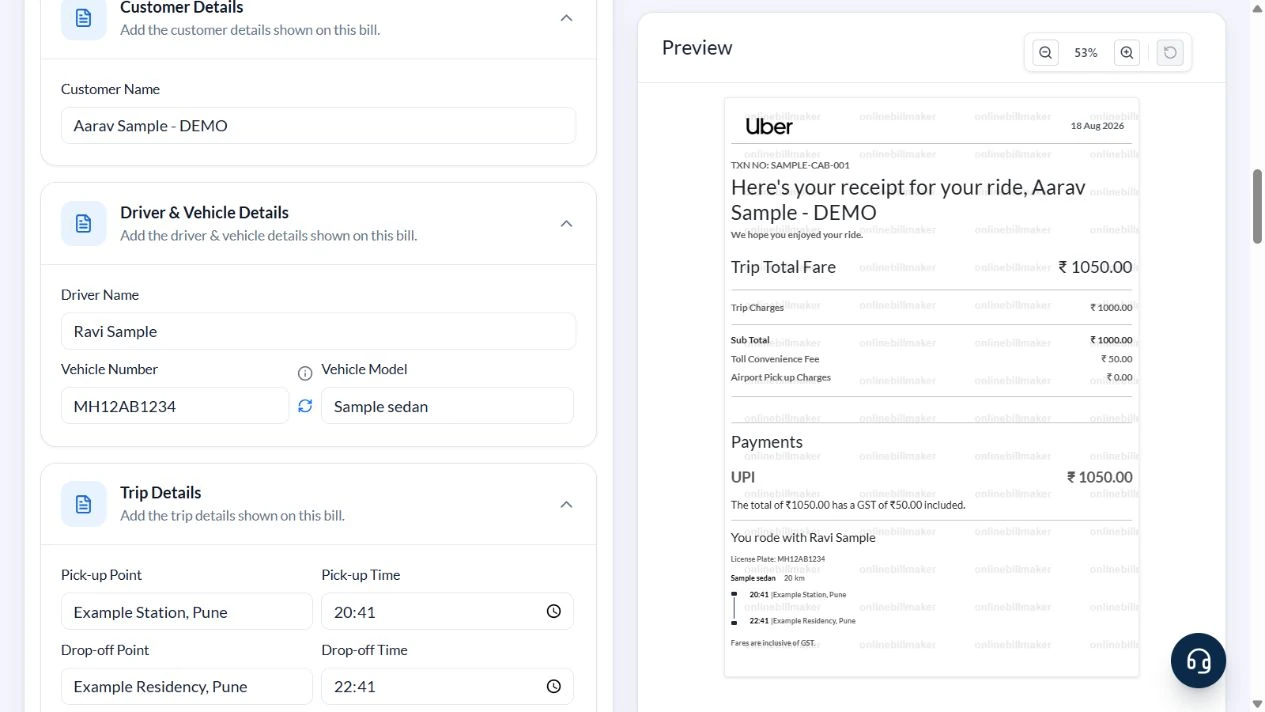
5. Inspect the output controls
Choose the file format only after reviewing the fare record. This walkthrough captured PDF and image controls; it did not buy access or open a downloaded file.
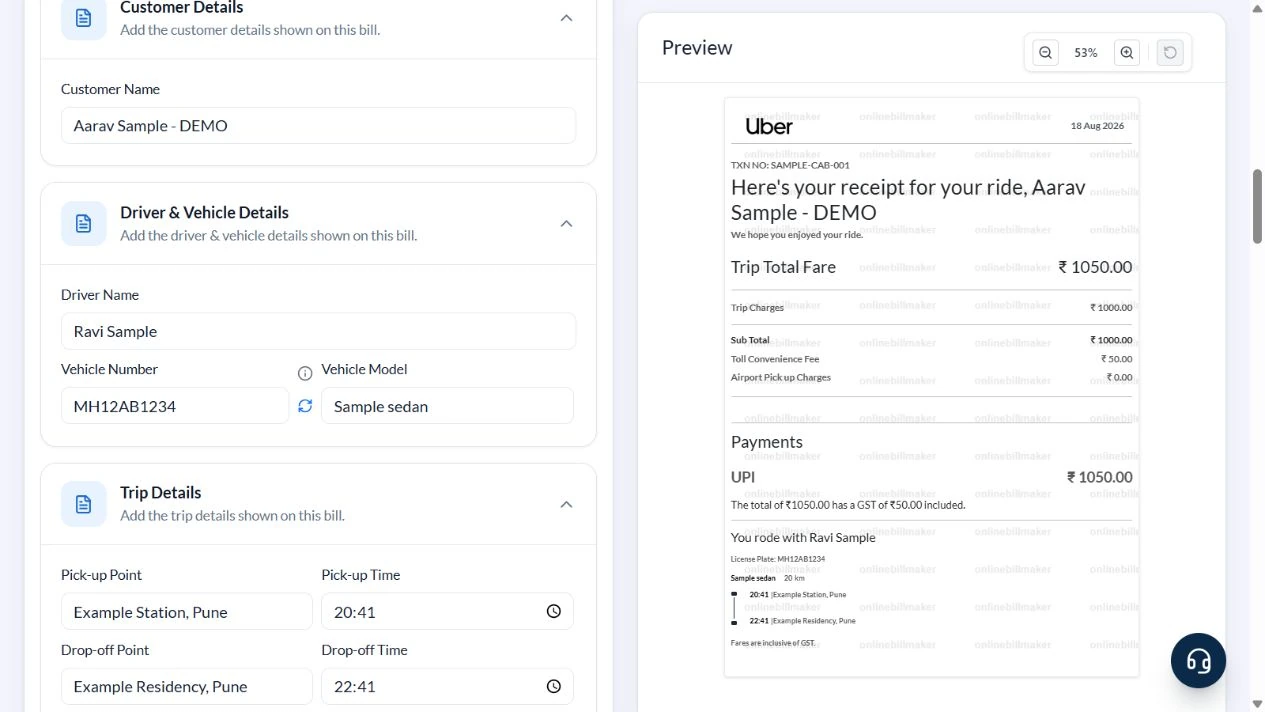
After downloading: inspect the file before sharing
If you complete an eligible download, open the saved PDF or image and compare it with the preview. Check the first and last lines, long addresses, amounts, dates and any acknowledgement area. Confirm that every intended page is present and readable at the size the recipient will use. Keep the source record and payment evidence with the final file so the document can be reconciled later.
If you spot an error, return to the editor and correct the source field before generating the replacement. Use a clear file name with the document reference and period so an older draft is not accidentally sent as the final copy.
₹1,050 total with an assumed included tax
| Item | Basis | Result |
|---|---|---|
| Trip Amount | Entered fare | ₹1,000 |
| Convenience Fee | Entered additional charge | ₹50 |
| Airport Charge | No charge in this example | ₹0 |
| Total | ₹1,000 + ₹50 | ₹1,050 |
| Included tax | ₹1,050 × 5 ÷ 105 | ₹50 |
| Amount excluding that tax | ₹1,050 − ₹50 | ₹1,000 |
The tax is contained in the total, so multiplying ₹1,050 by 5% would overstate it at ₹52.50. Distance is descriptive. For a source fare with waiting or other charges not represented by this layout, use a suitable breakdown rather than silently merging them into an unrelated label.
How do you handle long addresses and overnight journeys?
A cab travel bill format needs enough detail to distinguish one pickup from another. Review the date when a journey passes midnight and compare both displayed times with the source record. A taxi service bill format may show distance, but do not assume the entered distance automatically calculates the fare. The trip amount and separately entered charges still need their own reconciliation.
What should you review in a printable receipt?
An editable taxi receipt template is useful for correcting a spelling or reference before sharing. After an eligible download, inspect the printable taxi receipt template at normal size and check the first and last address lines. A cab duty slip format may serve a different operational purpose, so do not assume a payment receipt includes all the working-time or approval details required by a transport department.
Troubleshooting and final checks
- Do not enter kilometres expecting the tool to calculate a meter fare.
- Do not add included GST to the amount again.
- Keep a convenience fee distinct from a toll when describing the original charge.
- Review pickup and drop dates outside this same-day example if a journey crosses midnight.
Editing and previewing are free. Downloads require sign-in and either an active plan or enough purchased credits: 5 credits for a PDF and 1 credit for an image. There are no free download credits. Free users see the platform watermark in the preview. Signed-in users with a credit balance or an active plan can choose a download format and preview without the watermark. Compare download credits and plans.
The generator does not retrieve rides, validate driver details or issue an operator-confirmed receipt.