Create a hotel stay record with the guest, booking reference, check-in and check-out dates, and charges supported by the selected layout. Review the stay period and the amount together before downloading. Keep the hotel name distinct from a booking provider, and check whether the room charge is a total stay amount or a nightly rate in the selected layout. Add extra-bed or other supported charges only when they belong to the stay. The finished preview should let a reader connect the guest, dates, booking reference and paid amount without needing to guess the calculation. Start with the hotel bill format and room invoice generator.
The record and the example used here
A hotel bill identifies the stay and its charges. A booking receipt may instead summarise what was paid through a booking service. Choose the layout that matches the source record; hotel layouts do not all have the same tax or payment fields.
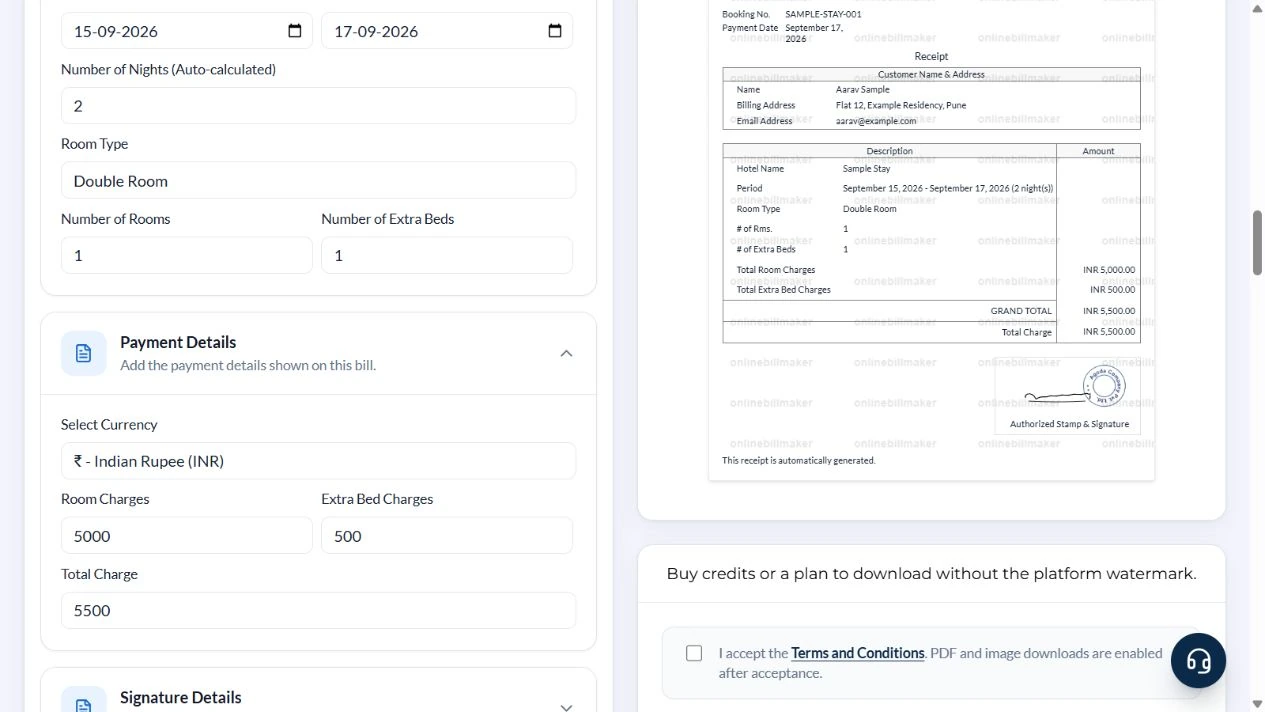
This example uses the stay-receipt layout with Number of Nights (Auto-calculated), Room Charges and Extra Bed Charges. The illustrative guest is Aarav Sample at Sample Stay, Pune, checking in on 15 September 2026 and out on 17 September 2026. That is two nights, even though three calendar dates are mentioned.
Room Charges is the amount for the entire stay in this layout. It is not multiplied by Number of Nights. Enter ₹5,000 for two nights at ₹2,500, then add one extra-bed charge of ₹500. Provider-style layouts are independent formats; they do not retrieve hotel bookings.
What does a hotel invoice sample help you check?
A hotel invoice sample shows how dates, room details and charges fit together. In the example, follow the booking reference through the form and the preview, then compare the guest details with the illustrated reservation. A simple hotel bill format can be easier to review than a crowded layout, particularly when the billing address is long. Choose clarity before decorative elements and keep the real property’s original documentation available.
Before you start: prepare and reconcile the details
A hotel stay has several relevant dates: booking, payment, check-in and check-out. They may all differ. Copy each into the matching field rather than using the payment date throughout the record. Check the number of nights against the overnight stays, not simply the number of calendar dates displayed.
In the demonstrated layout, review the meaning of Room Charges before entering a nightly price. A charge field that already represents the stay total must not be multiplied again. Keep extra beds, deposits and balances consistent with the hotel’s original statement, and do not call an amount paid merely because it appears in the total section.
Fields and sample values
| Field | Purpose | Sample value | When it applies |
|---|---|---|---|
| Company Name / Company Address | Identify the issuer of the booking receipt. | Sample Booking Desk; Example Road, Pune | The issuer may differ from the hotel. |
| Customer Name / Billing Address / Email Address | Identify the billed guest. | Aarav Sample; Pune; aarav@example.com | Email is a printed detail, not a delivery instruction. |
| Booking No / Payment Date | Connect the stay to the booking and payment. | SAMPLE-STAY-001; 17 September 2026 | Payment date need not be check-in date. |
| Hotel Name / Room Type | Describe the accommodation. | Sample Stay; Double Room | Confirm both in the selected preview. |
| Check-in Date / Check-out Date | Set the overnight period. | 15–17 September 2026 | Check-out must follow check-in. |
| Number of Nights (Auto-calculated) | Count the date difference. | 2 nights | Do not count both calendar endpoints. |
| Room Charges | Total room charge for the booking. | ₹5,000 for 2 nights × ₹2,500 | Multiply the nightly rate before entering this field. |
| Number of Extra Beds / Extra Bed Charges | Add the supported bed amount. | 1 bed × ₹500 | The layout multiplies these two fields. |
| Total Charge / Select Currency | Review the combined amount. | ₹5,500; INR | Room Charges + beds × bed charge. |
Follow the editor step by step
Work through these stages in order. The screenshots show the actual editor running on localhost with illustrative details. Open a screenshot at full size when you need to read a field label; compare the values with your own source record.
1. Choose Template 1
Under Select Template, choose Template 1, the stay-receipt layout. Its Stay Period section includes Number of Nights (Auto-calculated); Payment Details contains Room Charges and Extra Bed Charges. Other hotel layouts use different calculations.
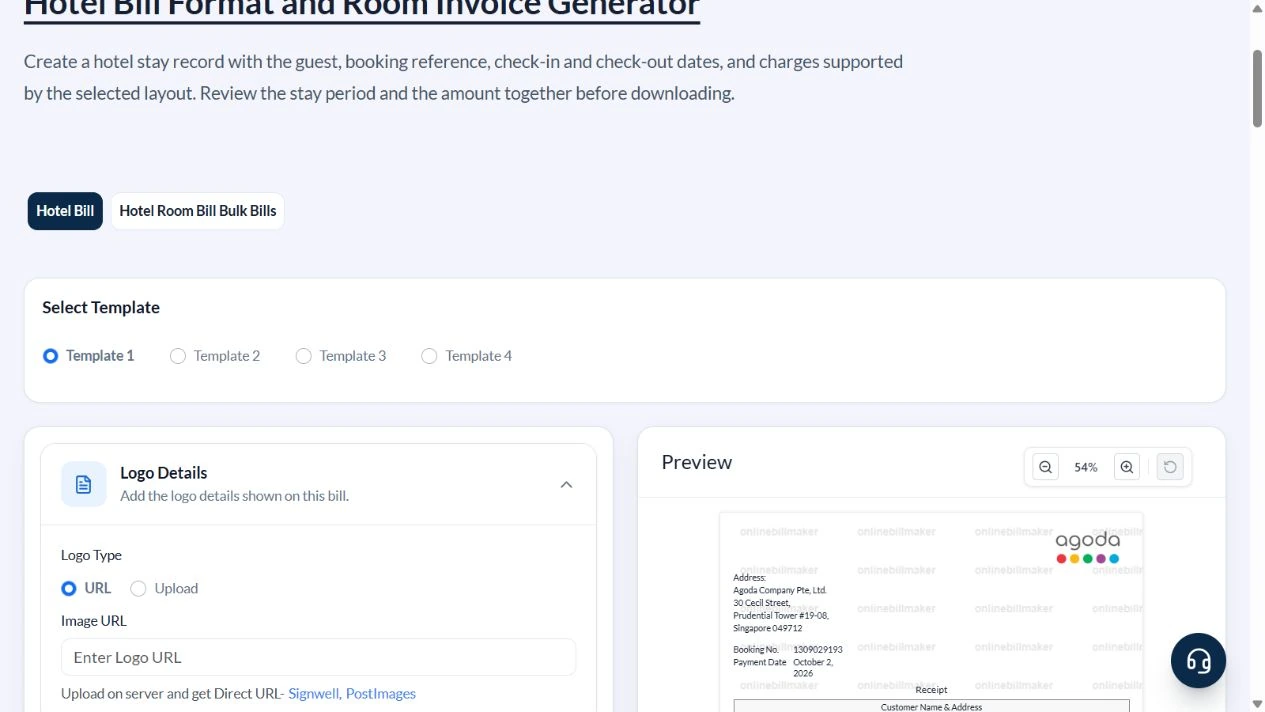
2. Enter issuer, guest and booking details
Complete Company Details with the correct issuer. Under Customer Details, enter Aarav Sample and the illustrative billing address. Under Booking Details, enter SAMPLE-STAY-001, Sample Stay and the payment date.
3. Enter the stay dates
Under Stay Period, choose 15 September 2026 for Check-in Date and 17 September 2026 for Check-out Date. Confirm 2 in Number of Nights. Choose Double Room, one room and one extra bed.
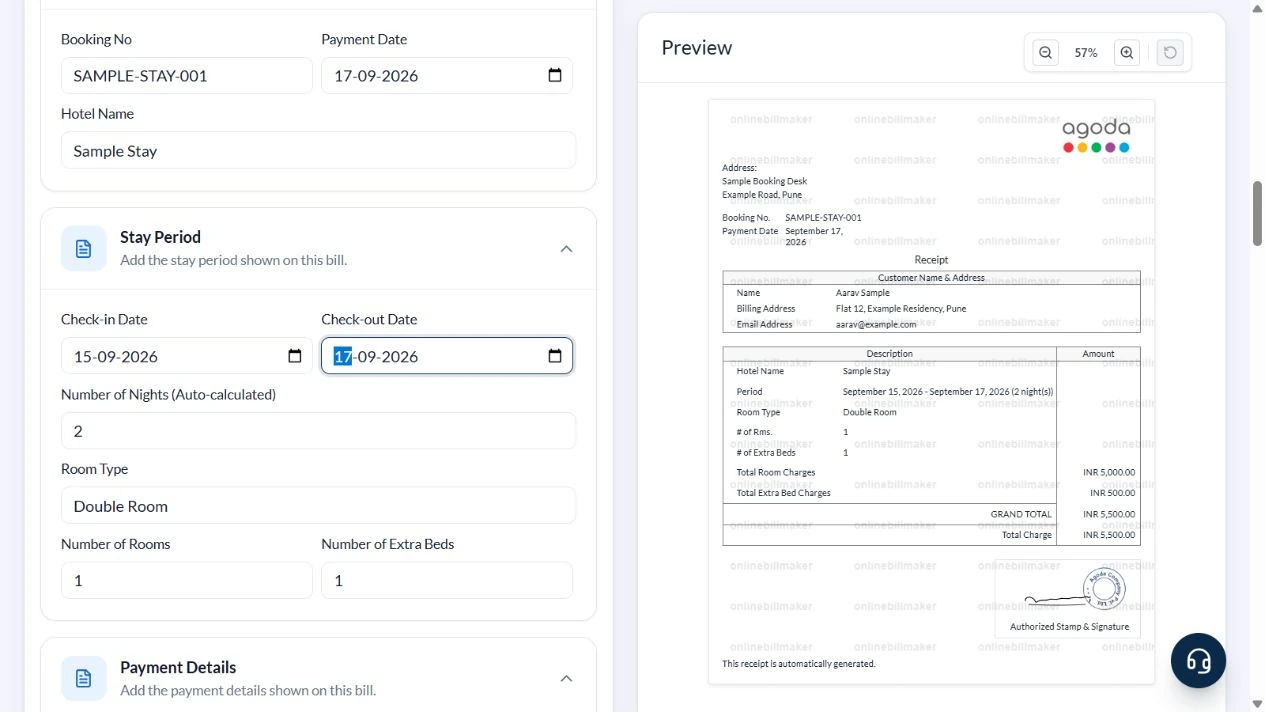
4. Reconcile the charges in the preview
In Payment Details, choose INR, enter 5000 in Room Charges and 500 in Extra Bed Charges. Check Total Charge is 5500. Compare the property, guest, booking number and dates with the preview.
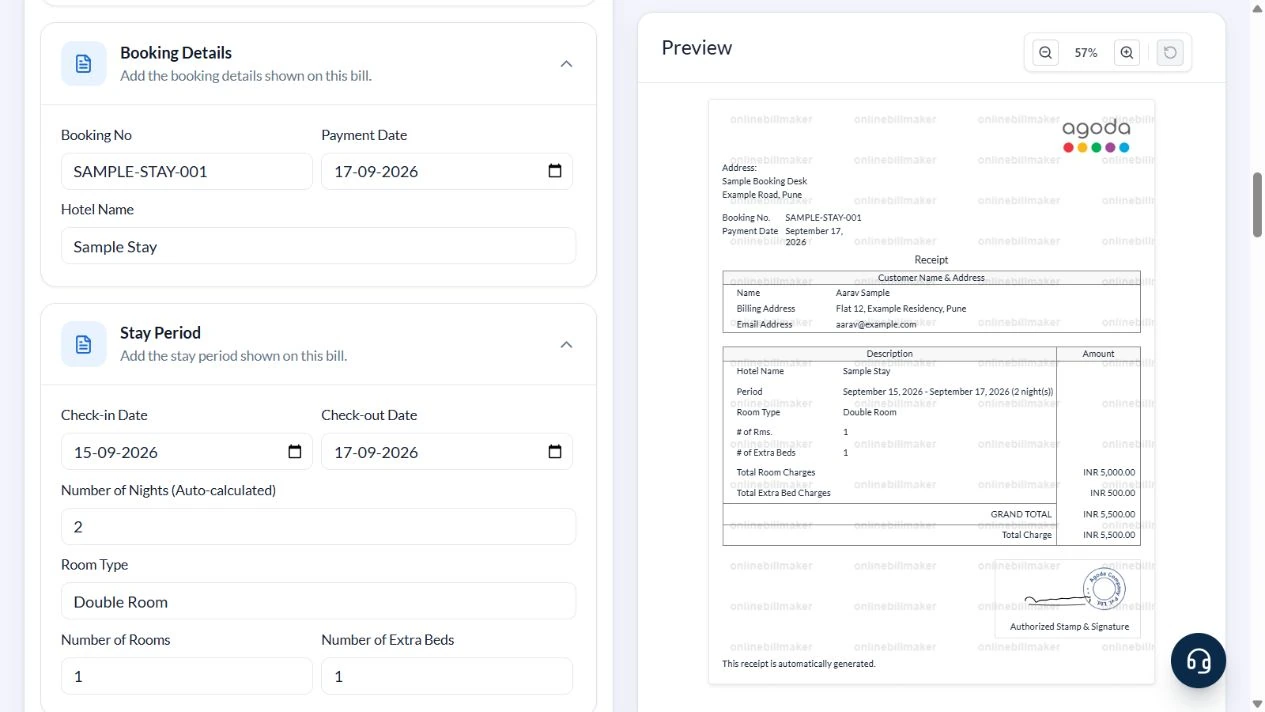
5. Review download access and the saved document
The download controls remain disabled until the user accepts the terms. Sign-in and paid access are also required. Choose PDF or PNG, JPG or WEBP image output, then inspect the resulting file at normal reading size. This walkthrough stopped at the controls; no terms were accepted, purchase made or exported file inspected.
After downloading: inspect the file before sharing
If you complete an eligible download, open the saved PDF or image and compare it with the preview. Check the first and last lines, long addresses, amounts, dates and any acknowledgement area. Confirm that every intended page is present and readable at the size the recipient will use. Keep the source record and payment evidence with the final file so the document can be reconciled later.
If you spot an error, return to the editor and correct the source field before generating the replacement. Use a clear file name with the document reference and period so an older draft is not accidentally sent as the final copy.
Two-night stay: ₹5,000 room charge plus ₹500 extra bed
| Item | Basis | Result |
|---|---|---|
| Nights | 17 September − 15 September | 2 |
| Room charge | 2 nights × ₹2,500 | ₹5,000 |
| Extra bed | 1 × ₹500 | ₹500 |
| Total charge | ₹5,000 + ₹500 | ₹5,500 |
| Separate payment reconciliation | ₹2,000 advance + ₹3,500 balance | ₹5,500 |
The last row is a manual reconciliation; this layout has no separate advance or balance calculation. Do not describe the full total as unpaid when part was already paid. This example does not prescribe a hotel GST rate. Use the correctly classified amounts from the source invoice.
What changes for a lodge or guest house?
A lodge bill format follows the same basic reconciliation: identify the property, guest, period and basis of the room charge. A lodge invoice format should explain nights and extra beds rather than combining them without a description. If a property bills by a different agreed period, confirm that the editor represents it accurately before proceeding. A hotel food bill format belongs to a different charge category and should not silently replace a room-stay record.
How should you check the final hotel PDF?
With a hotel bill sample PDF, inspect both the printed details and the file itself. Check that the check-out date has not become a chargeable extra night and that the booking and payment references are not swapped. A hotel bill editable format lets you correct the entered data before producing a replacement. Keep the corrected file clearly identified, retain the source original and avoid submitting two versions of the same expense.
Troubleshooting and final checks
- Room Charges already represents the stay. Entering the nightly price alone understates the total.
- Check-out-before-check-in is invalid even if the date-difference field displays a positive number.
- Keep booking-service fees separate when the source distinguishes them.
- A paid receipt, total amount due and remaining balance describe different facts.
Editing and previewing are free. Downloads require sign-in and either an active plan or enough purchased credits: 5 credits for a PDF and 1 credit for an image. There are no free download credits. Free users see the platform watermark in the preview. Signed-in users with a credit balance or an active plan can choose a download format and preview without the watermark. Compare download credits and plans.
Keep the hotel- or booking-provider-issued original. This editor does not confirm a reservation, verify payment or establish claim acceptance.