Prepare a course fee record with the learner, provider and training period. Describe an instalment clearly and keep the full agreed fee, payment evidence and remaining balance consistent. Identify the training provider, learner and course, and describe the dates or module covered by the payment. Keep an instalment distinct from the total course price, verify any applicable tax fields and compare the amount in words with the numerical total. The record should make the payment understandable without implying course completion or automatic access to training. Start with the course bill generator for training fees and instalments.
The record and the example used here
A course invoice states what the provider is charging. It is not an enrolment confirmation, completion certificate or independent proof that the learner paid. Keep the provider’s acknowledgement with the billing record.
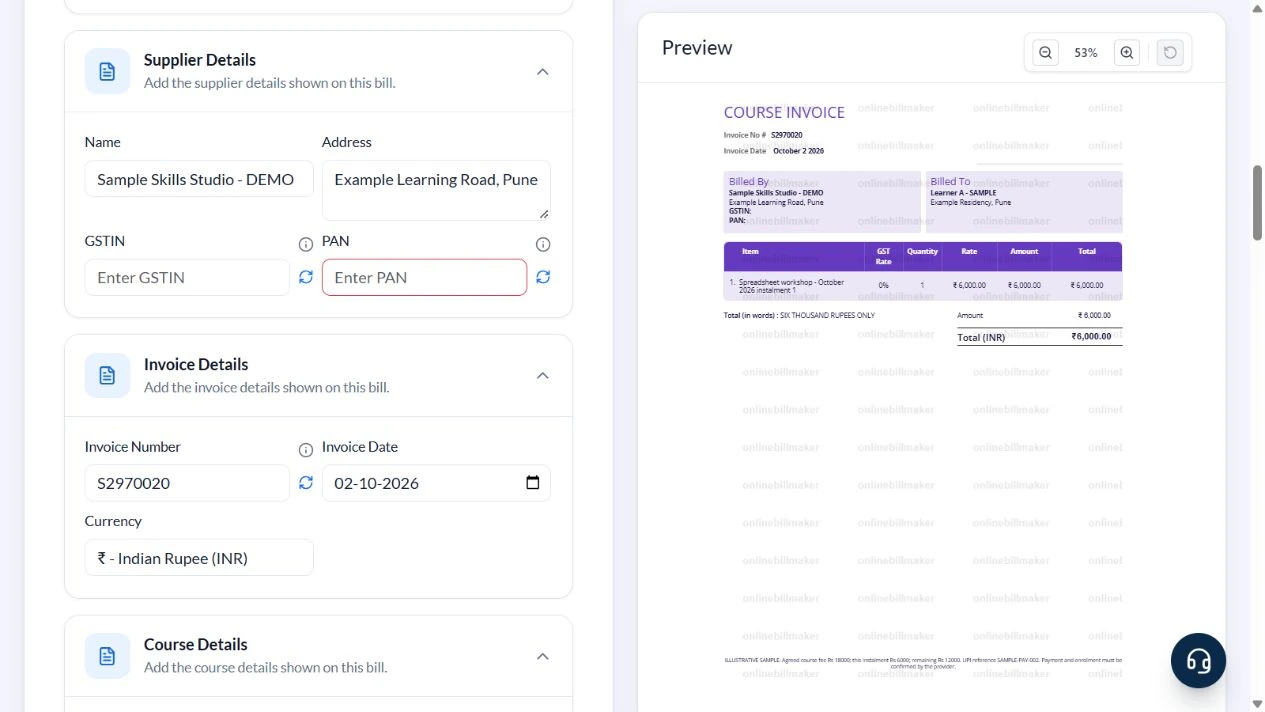
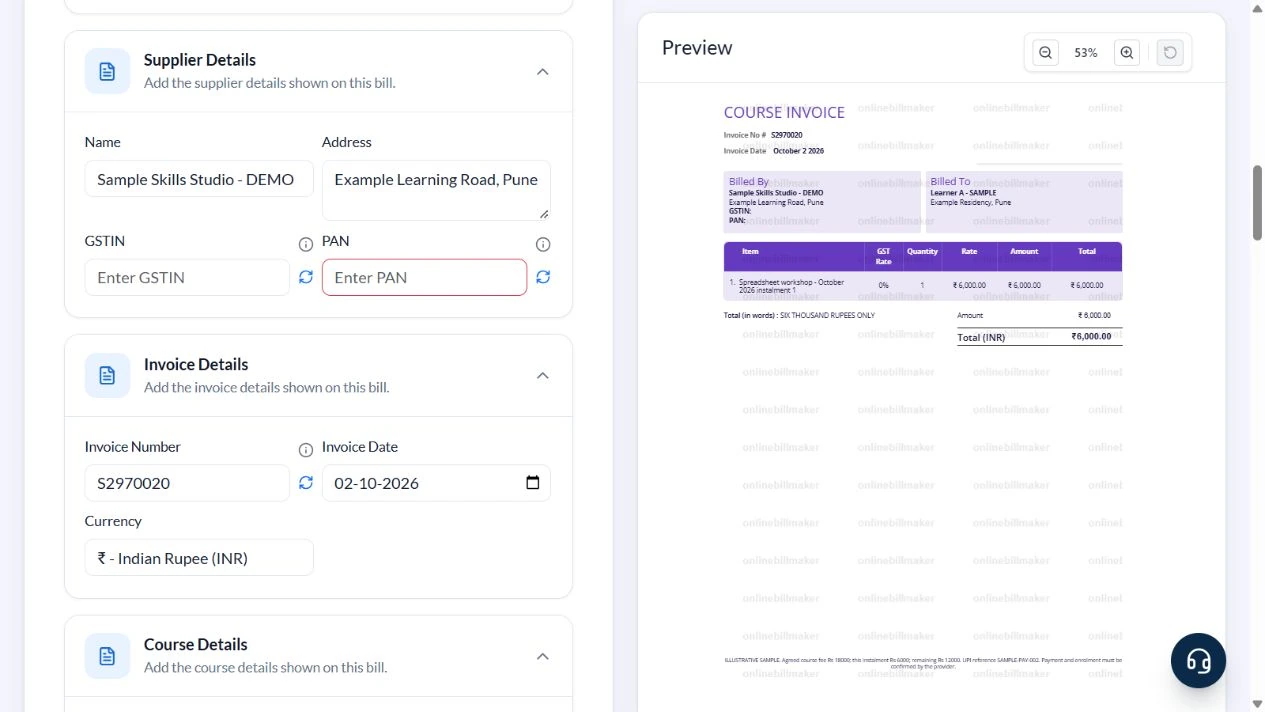
Template 2 is used for Sample Skills Studio – DEMO, Example Learning Road, Pune, and Learner A – SAMPLE at Example Residency, Pune. The item is Spreadsheet workshop – October 2026 instalment 1, quantity 1, rate ₹6,000. The captured invoice is S2970020, dated 2 October 2026.
The agreed ₹18,000 fee and ₹12,000 remaining balance are manually written in Footer Note. The form does not maintain an instalment ledger. No GST is selected for this arithmetic sample; it does not classify training services as exempt.
How do you choose the right fee receipt format?
A tuition fee receipt should make the learner, provider and fee purpose easy to connect. A receipt format for tuition fee payments may cover a month or a defined set of classes, so describe that basis clearly. If a course package is paid in stages, record only what the current document accurately represents and retain the separate instalment schedule where needed.
Before you start: prepare and reconcile the details
Read the enrolment or fee agreement before preparing the invoice. A course may be sold as one package, by module or through instalments. State which part is being billed and retain the wider payment schedule separately. A payment for one instalment should not be labelled as settlement of the whole course unless that is accurate.
For employer-sponsored training, distinguish the learner from the billed organisation. Use the agreed recipient details and include a course or enrolment reference where useful. If the provider changes dates or refunds a payment, keep that adjustment linked to the original record rather than silently replacing it.
Fields and sample values
| Field | Purpose | Sample value | When it applies |
|---|---|---|---|
| Recipient Name / Address | Identify the learner or billing recipient. | Learner A – SAMPLE; Example Residency, Pune | The UI labels are Name and Address within Recipient Details. |
| Supplier Name / Address | Identify the training provider. | Sample Skills Studio – DEMO | Provider logo choices do not establish an integration. |
| GSTIN / PAN | Enter actual supplier particulars where required. | Blank in the illustrative sample | Do not use generated placeholders as valid identifiers. |
| Invoice Number / Invoice Date | Reference the bill. | S2970020; 2 October 2026 | Template 2 enforces S followed by seven digits; other formats are replaced by a generated value. |
| Item / Quantity / Rate | State what this billed amount covers. | October workshop instalment 1; 1; ₹6,000 | The period and instalment label are typed in Item. |
| HSN/SAC Text / GST Rate / GST Type | Configure line classification and tax. | Blank; 0; No GST in this sample | Use the actual applicable treatment for a real supply. |
| Total (in words) | Reflect the invoice total. | SIX THOUSAND RUPEES ONLY | Updates from the calculated total. |
| Footer Note | Explain the fee agreement, payment reference and balance. | ₹18,000 fee; ₹6,000 instalment; ₹12,000 remaining | These figures are manually reconciled text, not calculated ledger fields. |
Follow the editor step by step
Work through these stages in order. The screenshots show the actual editor running on localhost with illustrative details. Open a screenshot at full size when you need to read a field label; compare the values with your own source record.
1. Select Template 2
Choose Template 2 and Select One in the logo dropdown. Expand Recipient Details, Supplier Details, Invoice Details, Course Details and Other Details.
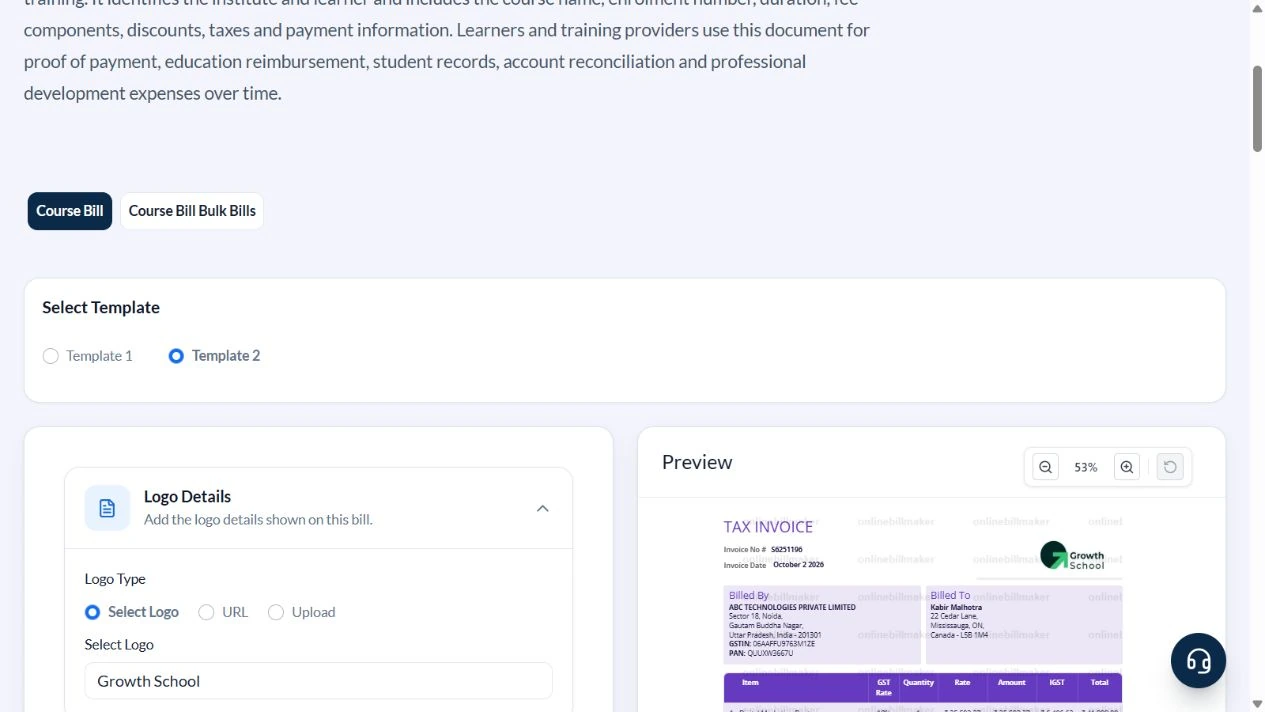
2. Enter the learner and provider
Use Learner A – SAMPLE and Example Residency, Pune in Recipient Details. Enter Sample Skills Studio – DEMO and Example Learning Road, Pune under Supplier Details. Clear GSTIN and PAN for the sample. Review the generated S-plus-seven-digit reference; the captured example is S2970020.
3. Bill one ₹6,000 instalment
Use Spreadsheet workshop – October 2026 instalment 1 in Item, Quantity 1 and Rate 6000. Clear HSN/SAC Text, enter GST Rate 0 and choose No GST for this illustration. Total becomes ₹6,000.
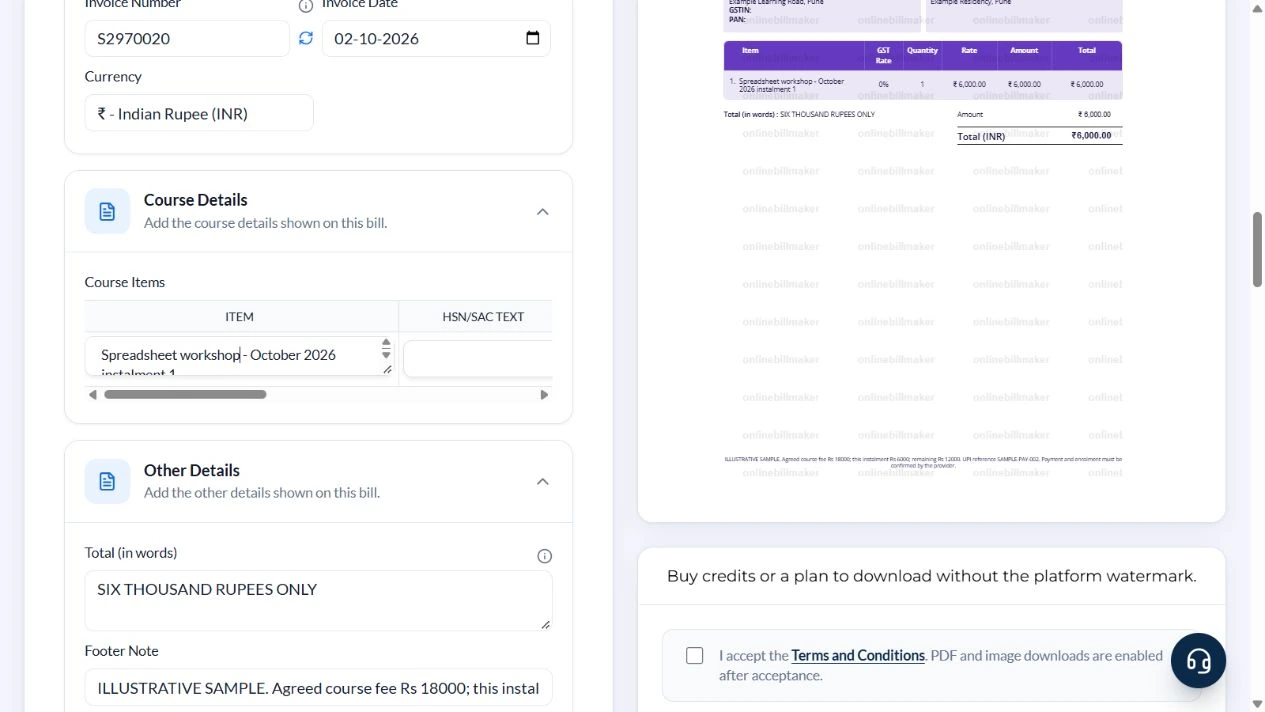
4. Add the balance note and inspect the invoice
In Footer Note state ILLUSTRATIVE SAMPLE, agreed fee Rs 18000, this instalment Rs 6000, remaining Rs 12000 and UPI reference SAMPLE-PAY-002. Explain that payment and enrolment must be confirmed by the provider. Verify ₹6,000 and SIX THOUSAND RUPEES ONLY in the COURSE INVOICE preview.
5. Review output choices
Inspect PDF and image controls below the preview. This walkthrough did not purchase access or inspect a downloaded file.
After downloading: inspect the file before sharing
If you complete an eligible download, open the saved PDF or image and compare it with the preview. Check the first and last lines, long addresses, amounts, dates and any acknowledgement area. Confirm that every intended page is present and readable at the size the recipient will use. Keep the source record and payment evidence with the final file so the document can be reconciled later.
If you spot an error, return to the editor and correct the source field before generating the replacement. Use a clear file name with the document reference and period so an older draft is not accidentally sent as the final copy.
One instalment against an ₹18,000 fee
| Item | Basis | Result |
|---|---|---|
| Agreed fee | Separate provider agreement | ₹18,000 |
| This billed instalment | 1 × ₹6,000 | ₹6,000 |
| Remaining after this instalment is paid | ₹18,000 − ₹6,000 | ₹12,000 |
| Invoice total | This document covers instalment 1 | ₹6,000 |
The ₹12,000 balance assumes the illustrated instalment is paid and no other adjustments exist. Update the note against the provider ledger; changing Rate does not recalculate numbers typed into Footer Note.
How should a course fee example be reconciled?
In a course fee receipt example, compare the description and quantity with the agreed learning package, then check the amount. A tuition fee slip format should not confuse the full course price with the amount actually acknowledged. Review the invoice and payment purpose with the provider before finalising it. The money receipt format for coaching classes does not by itself prove attendance or completion.
What does a fee receipt establish for tax or records?
A tuition fee receipt format for income tax is a documentation topic, not a guarantee that an expense qualifies for a deduction. Check the applicable rules and the institution’s issued evidence separately. When learning how to create a course fee receipt, review the final PDF against the source transaction and keep the provider’s authorised acknowledgement. The editor cannot establish educational eligibility or tax entitlement.
Troubleshooting and final checks
- Do not bill the full course amount and label it as only the first instalment.
- Review Invoice Number after editing because the layout enforces its reference format.
- Do not leave an old amount or balance in the footer after changing the item rate.
- A course logo does not validate enrolment or payment.
Editing and previewing are free. Downloads require sign-in and either an active plan or enough purchased credits: 5 credits for a PDF and 1 credit for an image. There are no free download credits. Free users see the platform watermark in the preview. Signed-in users with a credit balance or an active plan can choose a download format and preview without the watermark. Compare download credits and plans.
This generator does not connect to a course platform, verify a payment or issue educational credentials.