Prepare an invoice draft with supplier and recipient details, place of supply, item values and a visible GST breakup. Confirm the applicable particulars and tax treatment before using any real invoice. Enter the actual supplier and customer identifiers, item descriptions, quantities, rates and relevant tax percentages. Review discounts, place of supply and the applicable CGST/SGST or IGST treatment before checking the total. The template helps organise an invoice, while registration details, statutory particulars and any e-invoicing requirement still need to be confirmed for the specific transaction. Start with the gst invoice generator with item and tax breakup.
The record and the example used here
The GST template arranges entered invoice particulars and calculates item taxes. It does not verify registration, classify a supply, generate an official IRN or submit a return. Read the linked invoice-particulars guide for the distinction between core requirements and optional design fields.
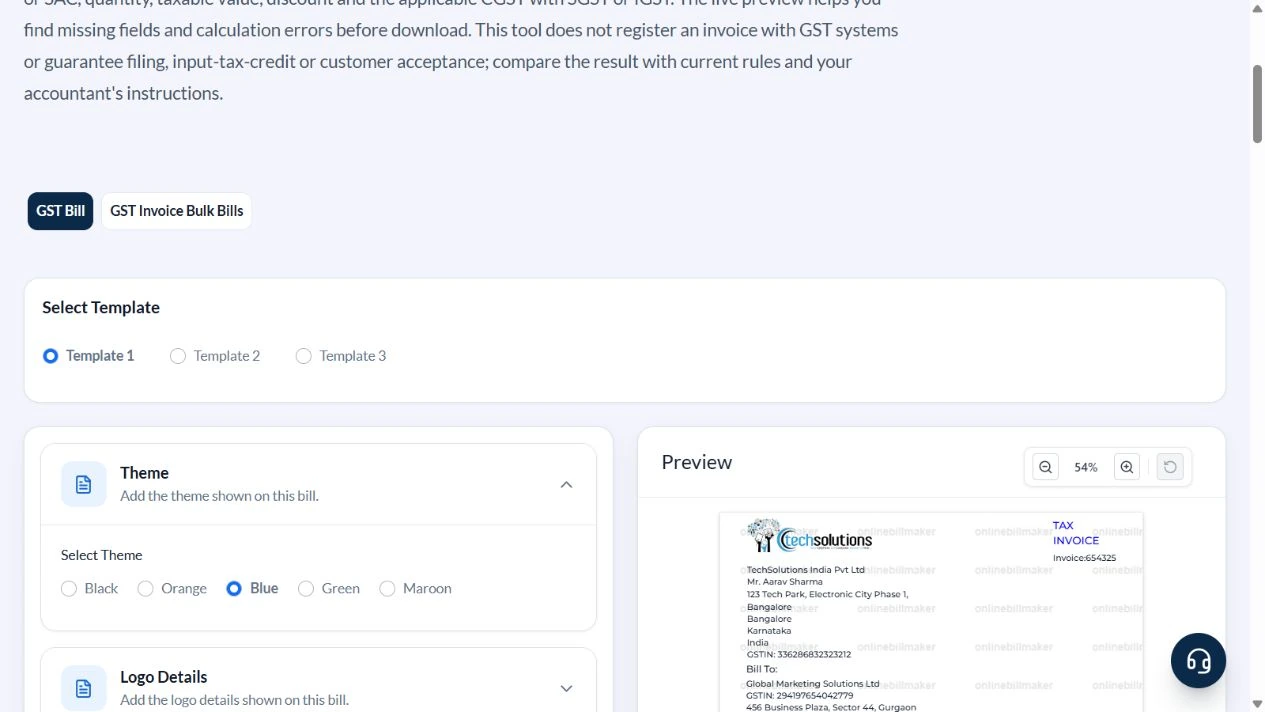
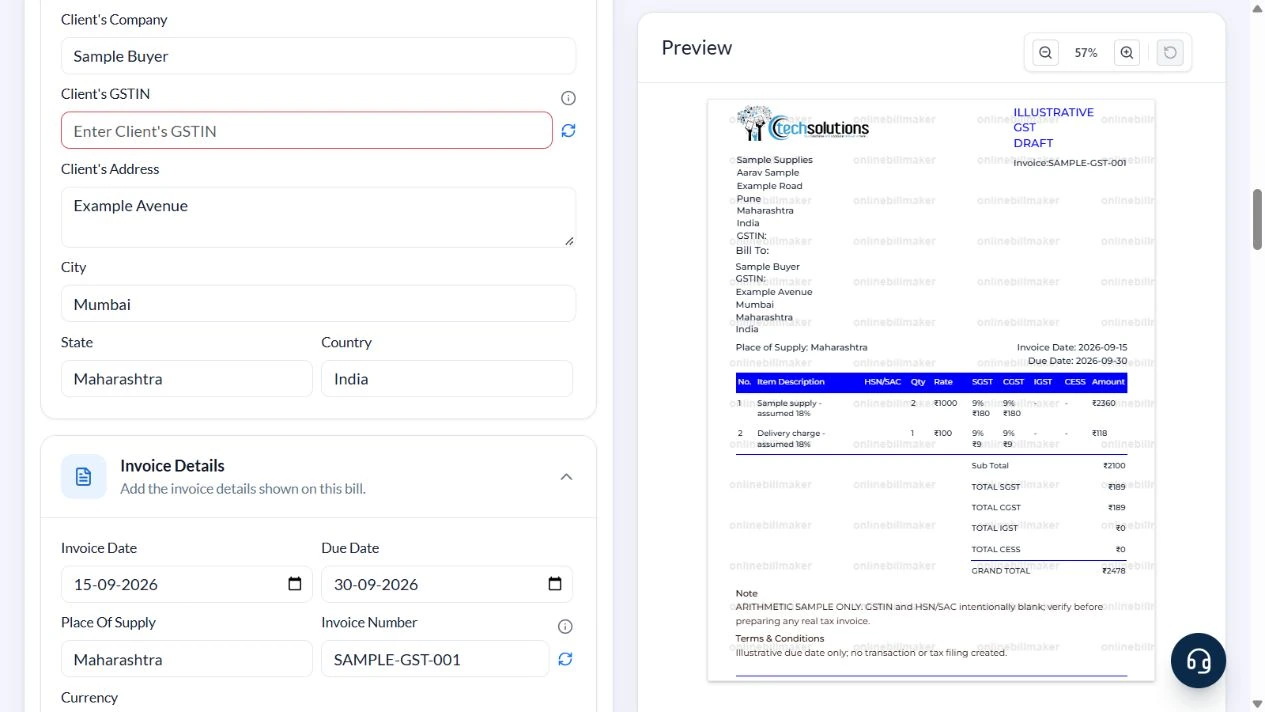
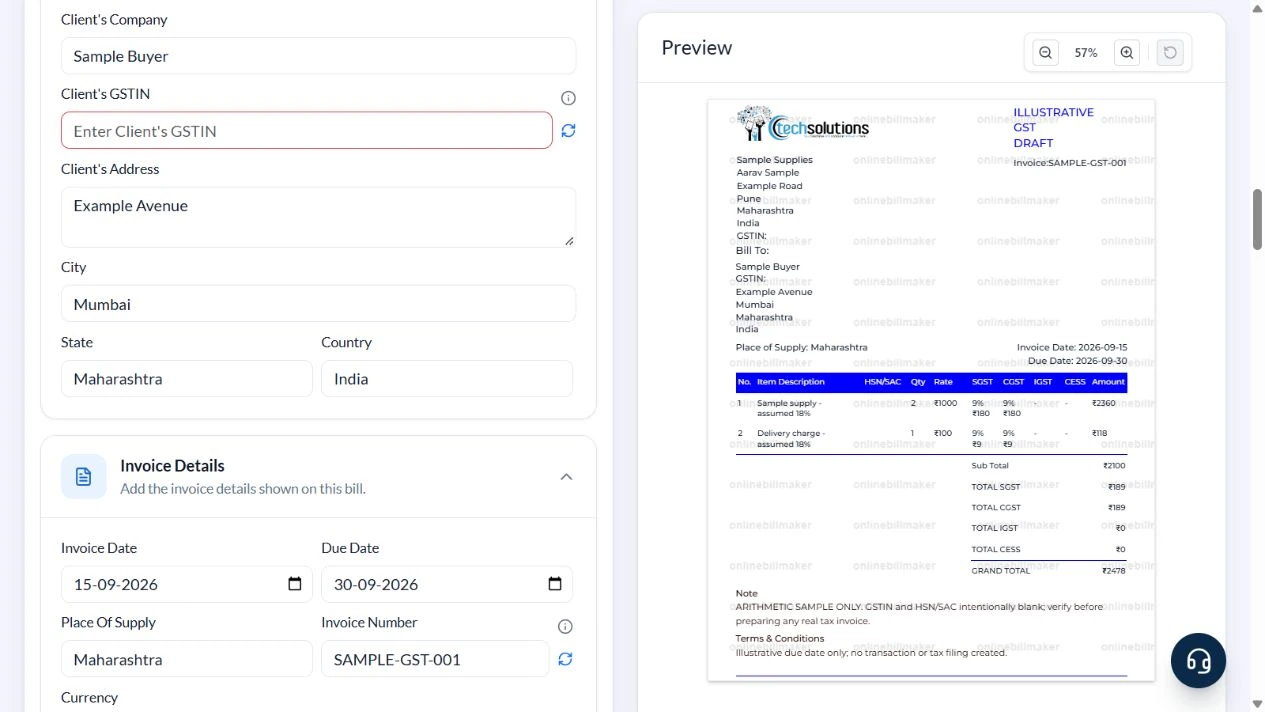
Template 1 of three layouts is demonstrated with Sample Supplies in Pune and Sample Buyer in Mumbai, place of supply Maharashtra, invoice SAMPLE-GST-001 dated 15 September 2026 and due date 30 September. The heading explicitly says ILLUSTRATIVE GST DRAFT.
The sample assumes 18% tax split into 9% CGST and 9% SGST solely to show arithmetic. GSTIN and HSN/SAC are intentionally blank instead of inventing valid identifiers or classifications. That makes the screenshot an incomplete teaching draft, not a ready-to-issue tax invoice.
How should you review a GST invoice sample?
A GST invoice sample is useful for checking where each fact belongs. Start with the parties, invoice number and supply details, then review the item descriptions and quantities. A simple GST bill format should still explain the taxable base and selected tax components. The illustrative rate in this walkthrough is only an arithmetic assumption; it does not classify your goods or services or confirm that the same rate applies to them.
Before you start: prepare and reconcile the details
Determine the transaction’s tax treatment before filling the tax columns. The location of the supplier and place of supply matter; a customer address by itself may not settle every case. Use the applicable classification and rate for the goods or services, and do not copy the illustrative percentage simply because the arithmetic works.
Reconcile item taxable values, tax amounts and the final payable total. Retain the approved invoice number and date within your actual invoicing records. If a required particular does not fit the selected layout, resolve that before issuing the document. A finished PDF does not itself register an invoice, create an IRN or complete a return.
Fields and sample values
| Field | Purpose | Sample value | When it applies |
|---|---|---|---|
| Company Name / Your Name / Company’s Address | Identify the supplier and contact. | Sample Supplies; Aarav Sample; Example Road, Pune | Use the registered supplier’s correct particulars for a real invoice. |
| Company’s GSTIN / Client’s GSTIN | Record relevant registration identifiers. | Blank in the teaching draft | Use verified identifiers where applicable; random generation does not validate registration. |
| Bill To / City / State | Identify the recipient. | Sample Buyer; Mumbai; Maharashtra | Recipient address alone does not settle every place-of-supply question. |
| Invoice Number / Date | Reference the billing event. | SAMPLE-GST-001; 15 September 2026 | Maintain the applicable serial-number requirements for actual tax invoices. |
| Place Of Supply | State the supply location used for the tax review. | Maharashtra | Determine it under the applicable supply rules. |
| Description / HSN/SAC / Qty / Rate | Describe and value each supply. | Sample supply; classification to verify; 2 × ₹1,000 | The demonstrated Rate is exclusive of the entered item taxes. |
| SGST% / CGST% / IGST% / CESS% | Enter applicable rates in their own columns. | 9 / 9 / 0 / 0 in this example | The fields are manual; do not add both tax systems for the same supply. |
| Notes and Terms / Due Date | Explain commercial terms and draft limitations. | Arithmetic sample only; due 30 September | A payment due date is distinct from invoice date. |
Follow the editor step by step
Work through these stages in order. The screenshots show the actual editor running on localhost with illustrative details. Open a screenshot at full size when you need to read a field label; compare the values with your own source record.
1. Choose Template 1 and label the draft
Open GST Invoice and select Template 1. Expand Invoice Heading and enter ILLUSTRATIVE GST DRAFT for this exercise. The theme colours change presentation, not the applicable tax rules.
2. Complete the parties and supply location
Open Your Company Details and Bill To. Use Sample Supplies in Pune and Sample Buyer in Mumbai, both Maharashtra. Clear the prefilled GSTINs for this teaching draft. In Invoice Details set SAMPLE-GST-001, 15 September 2026, due 30 September and Place Of Supply Maharashtra. Review rendered dates after editing.
3. Enter quantities and split rates
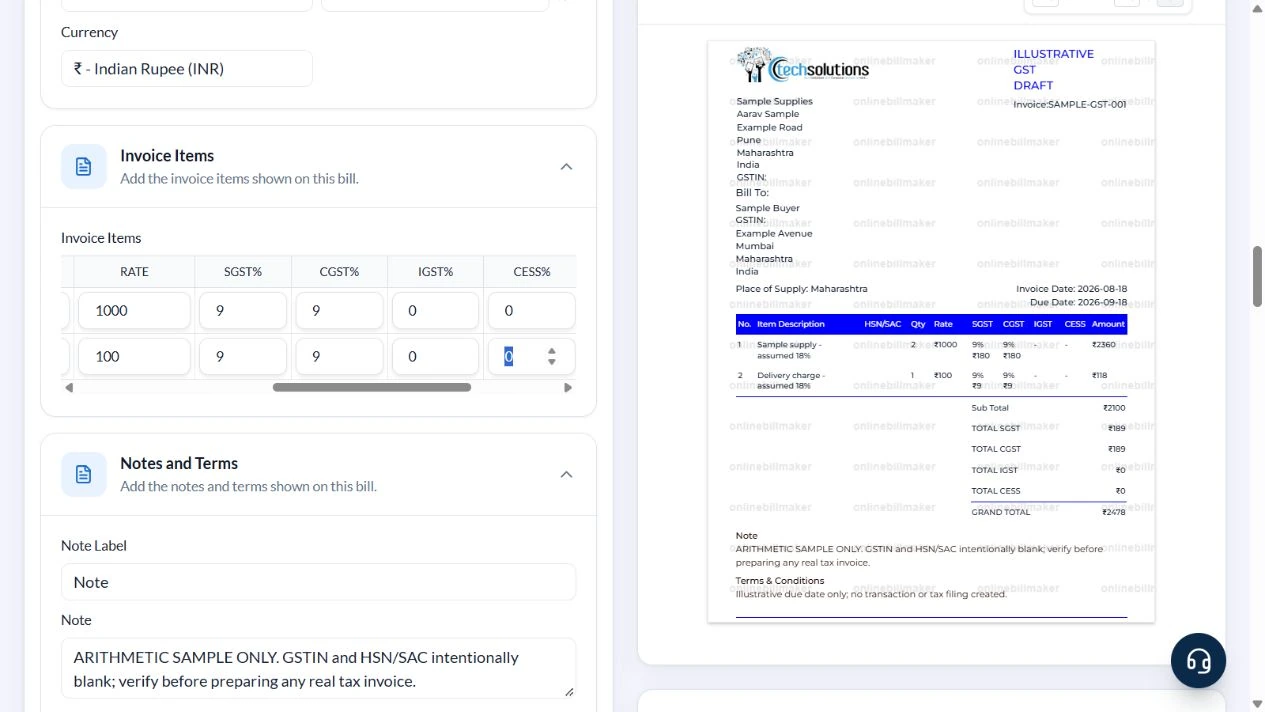
In Invoice Items keep two rows. Enter Sample supply – assumed 18%, quantity 2 and rate 1000, then Delivery charge – assumed 18%, quantity 1 and rate 100. Clear the example HSN/SAC values. Set SGST 9, CGST 9, IGST 0 and CESS 0 on each row.
4. Reconcile the draft and its missing particulars
The preview shows line totals ₹2,360 and ₹118, subtotal ₹2,100, CGST ₹189, SGST ₹189 and grand total ₹2,478. Add the note that GSTIN and HSN/SAC are intentionally blank and must be verified before any real tax invoice. Replace the default late-payment terms with the actual agreed terms when preparing a real record.
5. Review the export controls
Choose a suitable PDF or image format only after checking the complete invoice. The local walkthrough inspected the output controls but did not buy access, generate an official tax record or verify an exported file.
After downloading: inspect the file before sharing
If you complete an eligible download, open the saved PDF or image and compare it with the preview. Check the first and last lines, long addresses, amounts, dates and any acknowledgement area. Confirm that every intended page is present and readable at the size the recipient will use. Keep the source record and payment evidence with the final file so the document can be reconciled later.
If you spot an error, return to the editor and correct the source field before generating the replacement. Use a clear file name with the document reference and period so an older draft is not accidentally sent as the final copy.
₹2,100 taxable value plus ₹378 assumed GST
| Item | Basis | Result |
|---|---|---|
| Sample supply | 2 × ₹1,000 | ₹2,000 |
| Delivery charge | 1 × ₹100 | ₹100 |
| Taxable subtotal | ₹2,000 + ₹100 | ₹2,100 |
| CGST | ₹2,100 × 9% | ₹189 |
| SGST | ₹2,100 × 9% | ₹189 |
| Grand total | ₹2,100 + ₹189 + ₹189 | ₹2,478 |
The example assumes both lines share the stated treatment. Do not copy that assumption to a real delivery charge without checking the supply. Template 1 has no dedicated discount or reverse-charge switch; confirm that the selected layout can state every applicable particular. Keep detailed Rule 46 guidance in the linked supporting article.
How do the supply details affect the tax display?
An IGST invoice format and an invoice showing separate central and state components serve different transaction circumstances. Confirm the treatment before you enter percentages. The format of tax invoice under GST is more than a choice of colour or column labels: accurate identifiers and supply information matter. If a requirement is unclear, check it against the applicable rules and your business records rather than inferring compliance from a completed preview.
How do you preserve a reviewed invoice?
After checking the example, review your own GST sale invoice format against the order or service record. The GST invoice format download should preserve readable identifiers, descriptions and totals on every page. If the output needs correction, revise the source entry and follow the appropriate record-correction process; do not silently treat a new draft as a replacement for an already issued tax document. Save any required external acknowledgement with the reviewed file.
Troubleshooting and final checks
- Do not treat a random GSTIN generator as a registration check.
- Do not leave default HSN/SAC codes attached to unrelated supplies.
- Changing State or Place Of Supply does not relieve you of checking the manually entered tax columns.
- Do not enter a tax-inclusive price as Rate and then add the full tax again.
- The teaching screenshot intentionally omits particulars and must not be copied as a complete statutory invoice.
Editing and previewing are free. Downloads require sign-in and either an active plan or enough purchased credits: 5 credits for a PDF and 1 credit for an image. There are no free download credits. Free users see the platform watermark in the preview. Signed-in users with a credit balance or an active plan can choose a download format and preview without the watermark. Compare download credits and plans.
A formatted draft does not establish registration, correct classification, e-invoicing compliance or input-tax-credit eligibility.