Create a laundry bill with the garment or service, quantity, unit price and expected delivery date. State the pricing unit explicitly when one order mixes pieces and kilograms. List washing, ironing or dry-cleaning services with the garment count or measured weight used for pricing. Keep special treatments and expected delivery details clear, then check the customer, amount and payment information in the preview. A readable laundry receipt makes it easier to match the charge with the items handed over and the service actually requested. Start with the laundry bill generator for garments and weight-based services.
The record and the example used here
A laundry order can use more than one pricing basis. Four shirts for ironing are four garments; 2.5 kg of wash-and-fold is a weight. Describe the unit in each line so the customer can check the charge.
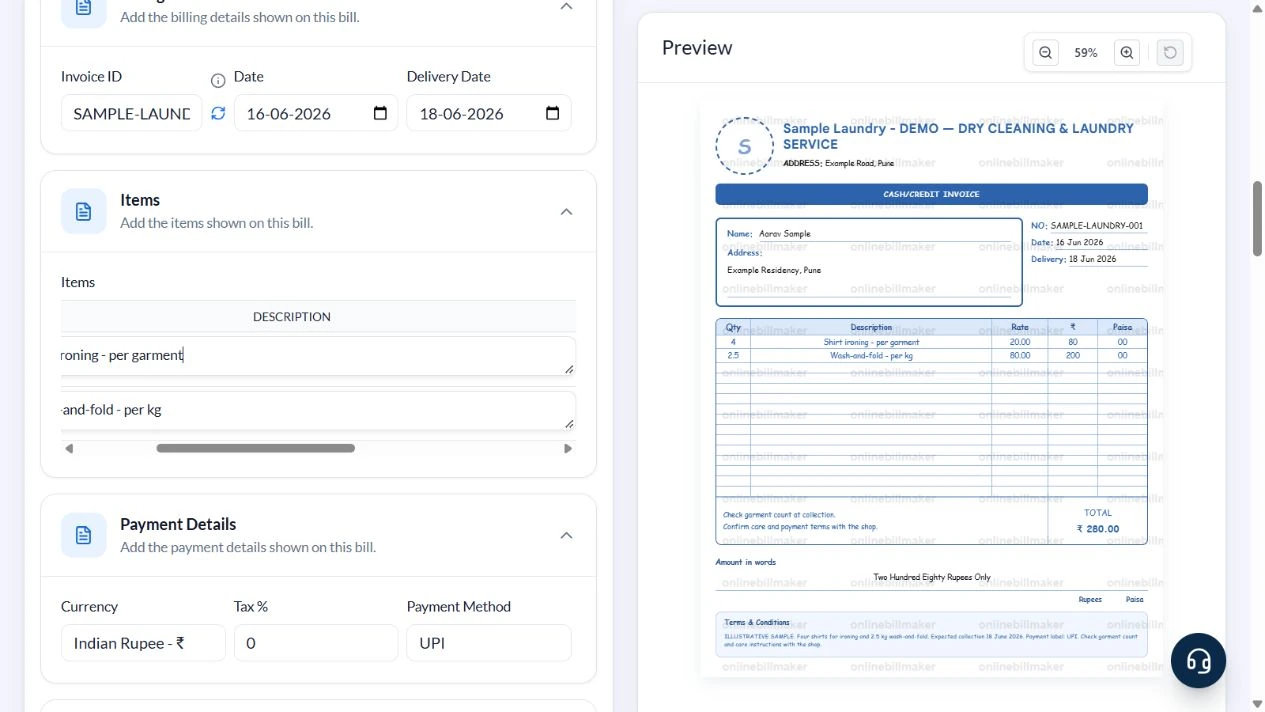
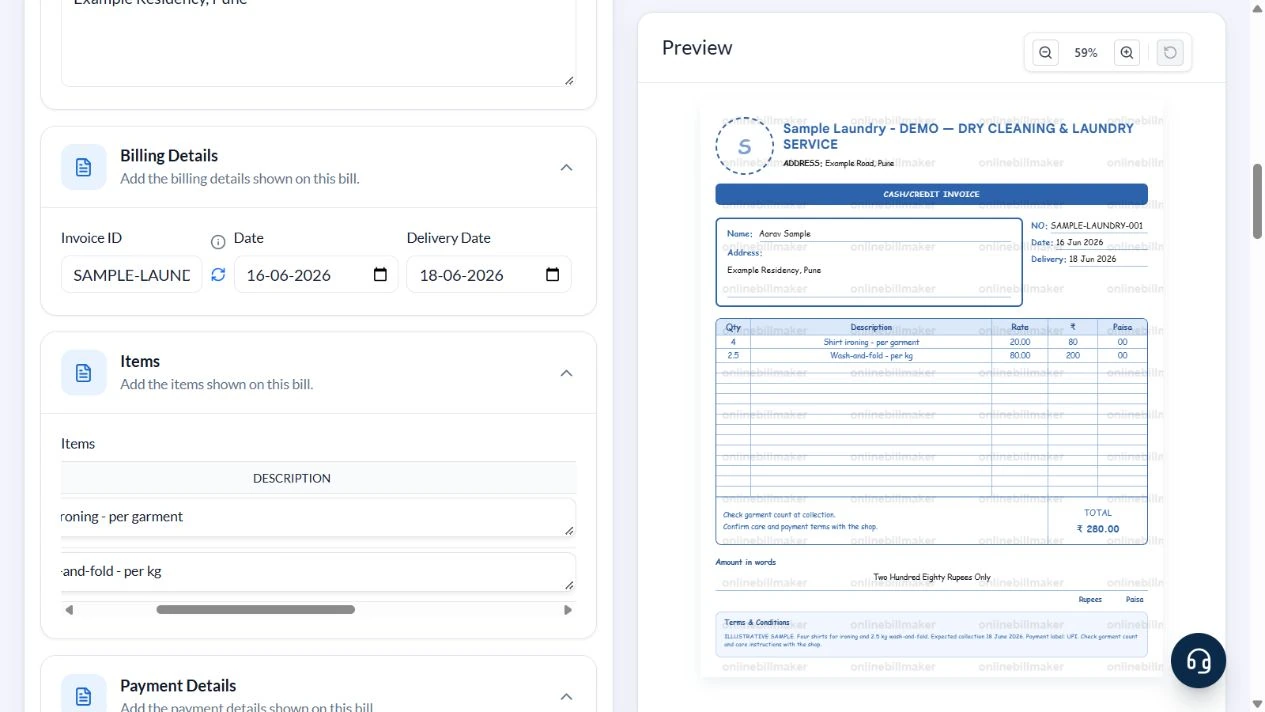
Template 1 of three layouts is demonstrated for Sample Laundry – DEMO, Example Road, Pune, and Aarav Sample. Invoice SAMPLE-LAUNDRY-001 is dated 16 June 2026 with expected delivery 18 June 2026. Four ₹20 ironing items plus 2.5 kg at ₹80 total ₹280.
The sample sets Tax % to zero for arithmetic and writes UPI in the editable note. Template 1 does not print a separate payment-mode line even when UPI is selected in the form.
How do you read a laundry invoice sample?
A laundry invoice sample should explain what was accepted for service and how each amount was calculated. In a laundry shop receipt sample, check whether the quantity means garments, pairs or sets. A laundry bill book sample can help show the arrangement, but the actual order description should govern your entries. Do not let an attractive layout hide an unclear unit of charge.
Before you start: prepare and reconcile the details
Count garments at handover and distinguish a garment count from a weight used for pricing. For a mixed order, a kilogram-based wash and per-piece ironing should appear as different services. Describe delicate items or separately charged treatments clearly so they are not confused with the standard rate.
Confirm the expected delivery date and any collection arrangement with the laundry. These are entered details, not an automated schedule. When part of an order is returned later or a service is cancelled, keep a clear adjustment record. The original item count helps resolve questions about both the price and the goods being returned.
Fields and sample values
| Field | Purpose | Sample value | When it applies |
|---|---|---|---|
| Laundry Name / Address | Identify the service provider. | Sample Laundry – DEMO; Example Road, Pune | Keep the pickup shop clear. |
| Customer Name / Address | Identify the order recipient. | Aarav Sample; Example Residency, Pune | Avoid adding unnecessary private details. |
| Invoice ID / Date / Delivery Date | Reference the order and expected collection. | SAMPLE-LAUNDRY-001; 16–18 June 2026 | Delivery Date is entered manually, not a scheduling promise. |
| Qty / Description / Price | Define units and calculate each service. | 4 shirts × ₹20; 2.5 kg × ₹80 | Put per garment or per kg in Description. |
| Tax % | Apply the entered bill-level rate. | 0 for this arithmetic sample | This is not a statement that laundry services are exempt. |
| Payment Method / Terms & Conditions | Keep payment and care notes accurate. | UPI; sample care and collection note | The demonstrated preview needs the payment label in the note to display it. |
Follow the editor step by step
Work through these stages in order. The screenshots show the actual editor running on localhost with illustrative details. Open a screenshot at full size when you need to read a field label; compare the values with your own source record.
1. Select the ruled laundry invoice
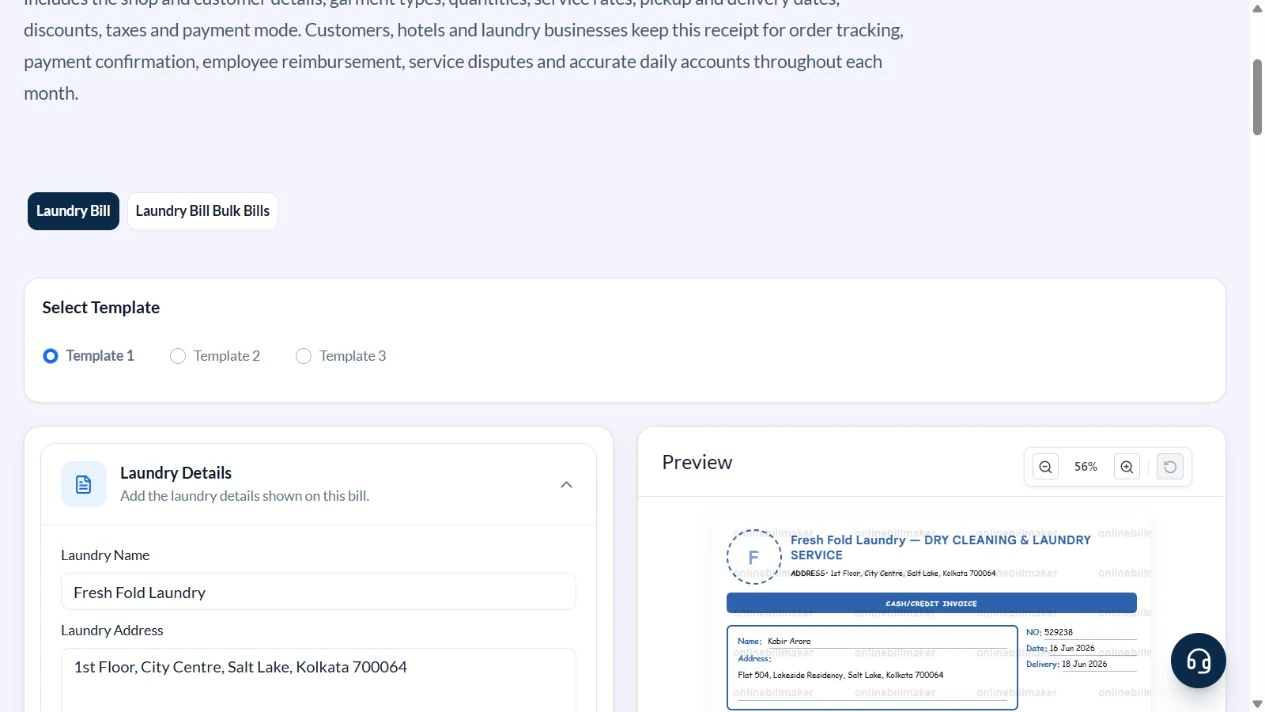
Choose Template 1. Expand Customer Details, Billing Details, Items, Payment Details and Additional Details.
2. Enter the shop, customer and dates
Use Sample Laundry – DEMO, Example Road, Pune, Aarav Sample and Example Residency, Pune. Enter SAMPLE-LAUNDRY-001. The sample Date is 16 June 2026 and Delivery Date is 18 June 2026.
3. Add separately priced services
Enter Qty 4, Shirt ironing – per garment, Price 20. Use Add Row for Qty 2.5, Wash-and-fold – per kg, Price 80. Set Tax % to zero for the illustration and select UPI.
4. Check ₹80 plus ₹200 and the collection note
Replace default Terms & Conditions with a sample note naming four shirts, 2.5 kg wash-and-fold, expected collection 18 June 2026 and Payment label: UPI. Ask the customer to check garment count and care instructions with the shop. Verify ₹280 and Two Hundred Eighty Rupees Only.
5. Inspect download controls
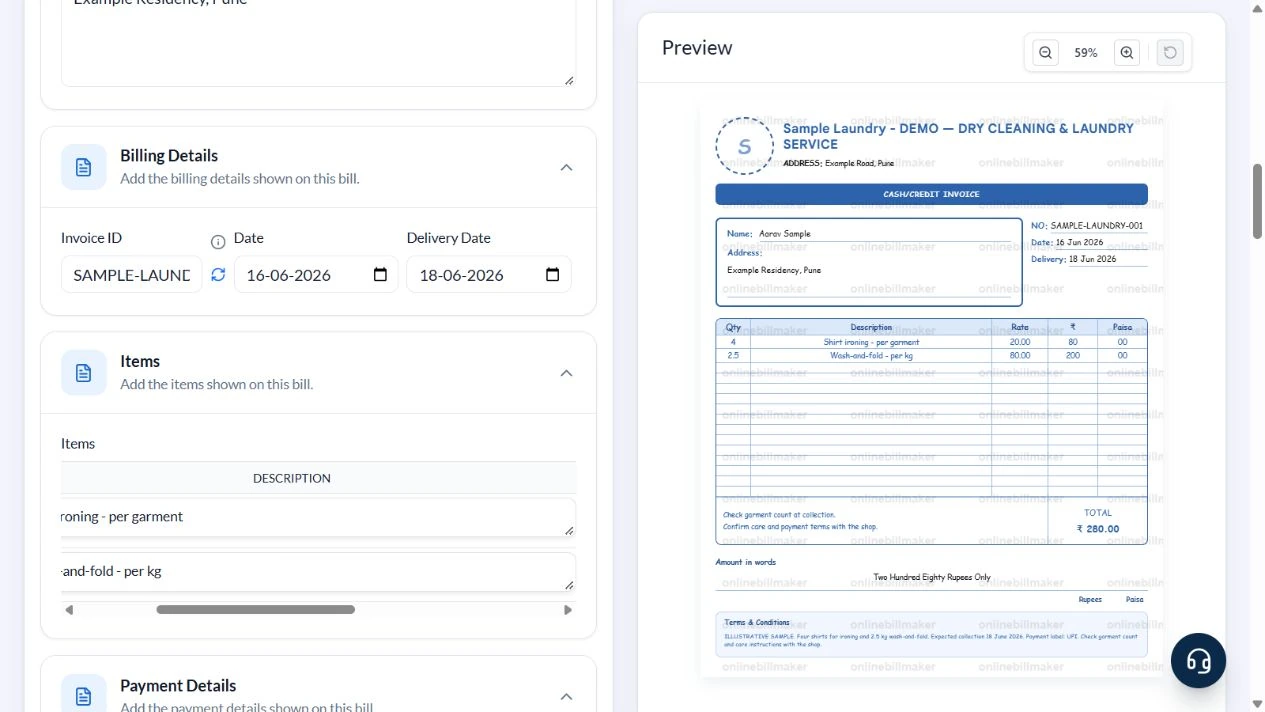
Review the PDF and image choices after checking the garment count and dates. No purchase or downloaded-file inspection was performed.
After downloading: inspect the file before sharing
If you complete an eligible download, open the saved PDF or image and compare it with the preview. Check the first and last lines, long addresses, amounts, dates and any acknowledgement area. Confirm that every intended page is present and readable at the size the recipient will use. Keep the source record and payment evidence with the final file so the document can be reconciled later.
If you spot an error, return to the editor and correct the source field before generating the replacement. Use a clear file name with the document reference and period so an older draft is not accidentally sent as the final copy.
Two services, ₹280 total
| Item | Basis | Result |
|---|---|---|
| Shirt ironing | 4 garments × ₹20 | ₹80 |
| Wash-and-fold | 2.5 kg × ₹80/kg | ₹200 |
| Subtotal | ₹80 + ₹200 | ₹280 |
| Sample tax | 0 entered for this illustration | ₹0 |
| Invoice total | ₹280 + ₹0 | ₹280 |
The weight is already 2.5 kg; entering 2500 would mean 2,500 units at the displayed rate. This layout has no dedicated discount field, so do not describe a manual net price as an automatic discount.
How should the service charges be reconciled?
A laundry bill calculation should use the agreed quantity and rate for each service. Keep washing and ironing charges distinguishable when the provider prices them separately. A laundry invoice with tax also needs the treatment that applies to the actual transaction. Compare the source order and final amount before saving; the editor does not decide the tariff or calculate a fee from garment condition.
What should you check at the final review stage?
When learning how to create a laundry bill, compare the invoice reference, customer, service list and delivery date with the order record. An editable laundry receipt helps you fix an entry before sharing, but the provider’s actual acknowledgement remains important. A hotel laundry bill format may need a room or stay reference that this layout does not provide, so verify that the selected fields fit the intended use.
Troubleshooting and final checks
- Do not combine pieces and weight into one unexplained quantity.
- Check that Delivery Date is after the order date.
- Replace default care or refund terms with the actual agreed policy.
- Read the preview: choosing a payment mode in the form does not mean this layout prints a separate payment line.
Editing and previewing are free. Downloads require sign-in and either an active plan or enough purchased credits: 5 credits for a PDF and 1 credit for an image. There are no free download credits. Free users see the platform watermark in the preview. Signed-in users with a credit balance or an active plan can choose a download format and preview without the watermark. Compare download credits and plans.
The invoice does not verify garment condition, arrange collection or authenticate a payment.