Prepare a broadband billing record with a clear account reference, service period and plan charge. Distinguish the plan price, any adjustment and the final amount shown for payment. Keep the subscriber name, installation address, billing account and internet plan consistent with the original provider statement. Explain one-time charges or discounts separately from the recurring subscription where the layout allows it. Review the service period and final amount before downloading; the record organises billing information and does not renew service or confirm that the provider received payment. Start with the wi-fi bill generator for broadband plan records.
The record and the example used here
The Wi-Fi editor offers four layouts with different field groups. Template 2 is demonstrated because it includes a discount, service description and tax controls. The selected layout is a receipt-style record and labels the final sum Payments Received; use that label only when it matches the actual payment status.
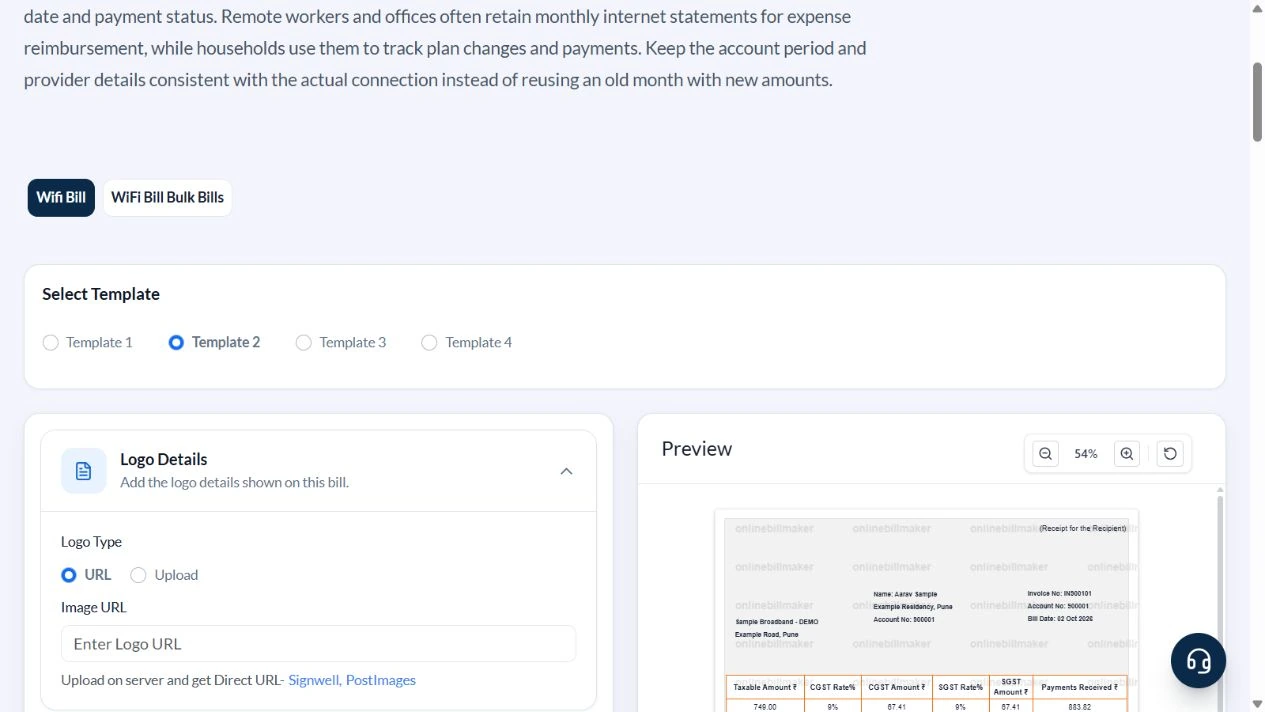
Sample Broadband – DEMO supplies an illustrative 100Mbps Unlimited monthly plan to Aarav Sample, account 900001. Invoice input 900101 prints as IN900101. Billing date is 2 October 2026, and Description states the coverage period 1–31 October 2026.
The sample starts at ₹799, subtracts an agreed ₹50 adjustment and applies an assumed 18% tax split. This is an arithmetic illustration, not a current provider tariff or a universal broadband tax determination.
How do you check an internet bill example?
An internet bill example should connect the customer account, plan and billing period to the charged amount. Compare the provider details and account reference before reviewing the arithmetic. A WiFi bill sample is useful for explaining field placement, but it does not prove the connection exists. Replace all illustrative values with details from your provider-issued statement when preparing a personal record.
Before you start: prepare and reconcile the details
A broadband account may have a billing address that differs from the connection’s installation address. Use the correct context for each available field. Describe the service period explicitly so an advance payment for several months is not mistaken for one monthly charge. Keep a provider’s actual bill number separate from an internal reference.
Compare the stated plan charge, fixed discount and tax setting with the provider bill. Router purchase, installation or refundable equipment deposits are not necessarily recurring subscription fees. If the chosen layout cannot explain those components clearly, use a suitable itemised record and keep the original provider statement alongside it.
Fields and sample values
| Field | Purpose | Sample value | When it applies |
|---|---|---|---|
| Internet Service Provider Name / Address | Identify the provider shown in the record. | Sample Broadband – DEMO; Example Road, Pune | An editable provider name does not imply an account integration. |
| Bill Account Number / User Name | Link the monthly record to the subscriber. | 900001; sample-account | Use the actual account reference for a real statement. |
| Billing Date / Description | Distinguish issue date and service period. | 2 October 2026; coverage 1–31 October 2026 | Template 2 has no dedicated from/to inputs; put the period in Description. |
| Customer Name / Address | Identify the billed subscriber. | Aarav Sample; Example Residency, Pune | May differ from the installation address on another layout. |
| Tariff Plan Speed / Package / Plan | Label the agreed service. | 100Mbps; Unlimited; Monthly | Labels do not measure speed or renew the connection. |
| Total Plan Amount / Discount Amount | Enter the starting charge and rupee adjustment. | ₹799; ₹50 | In Template 2 the amount is before the entered discount and tax. |
| Tax Type / Tax Rate (%) | Set split tax or IGST for the sample calculation. | CGST + SGST; 18% assumed | Check the actual applicable treatment. |
| Invoice No / Payment Method | Identify the record and payment label. | 900101 → IN900101; UPI | The layout prefixes the invoice number with IN. |
Follow the editor step by step
Work through these stages in order. The screenshots show the actual editor running on localhost with illustrative details. Open a screenshot at full size when you need to read a field label; compare the values with your own source record.
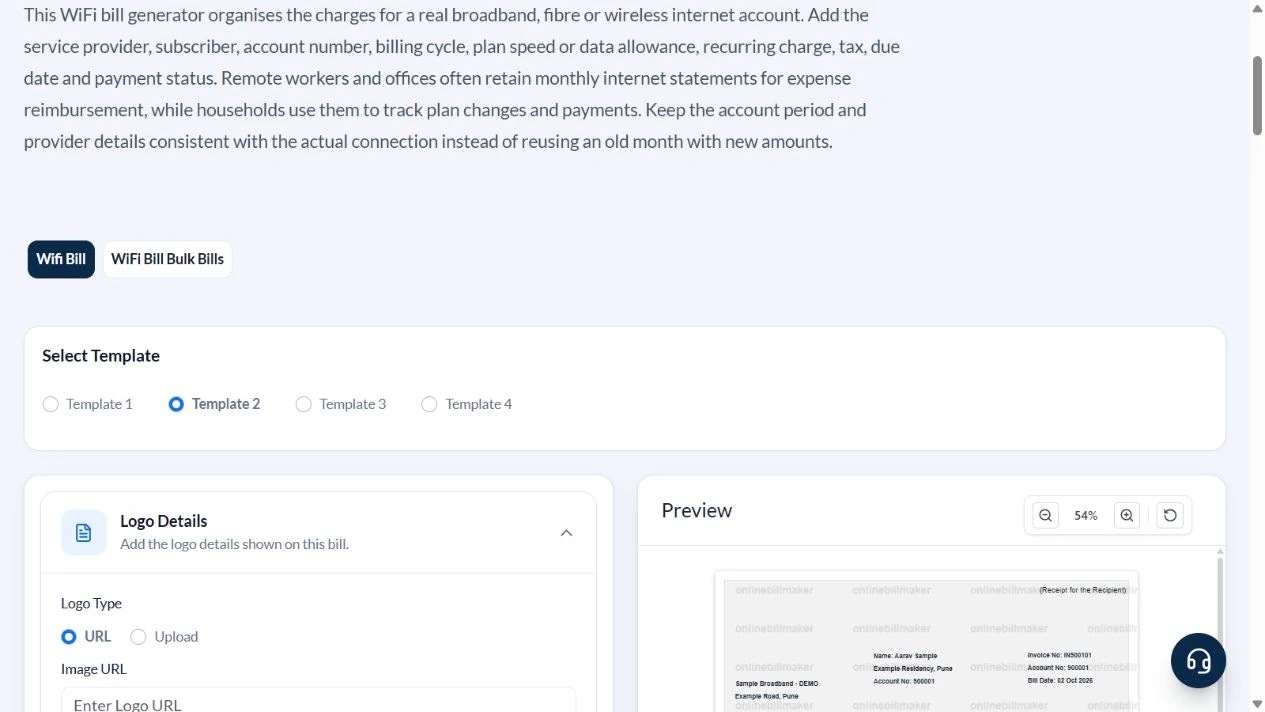
1. Select the discount-capable layout
Open WiFi Bill and choose Template 2. Wait for its fields to load; changing layouts replaces several defaults. The editor includes Internet Provider Details, Customer Details, plan fields, Payment Details and Tax Details.
2. Enter subscriber and coverage period
Replace the provider with Sample Broadband – DEMO and Example Road, Pune. Use account 900001, user name sample-account, customer Aarav Sample and Example Residency, Pune. In Description write ILLUSTRATIVE SAMPLE: 100Mbps monthly plan, 1–31 October 2026, Rs 50 agreed adjustment. The demonstrated Billing Date is 2 October.
3. Set plan, discount and tax inputs
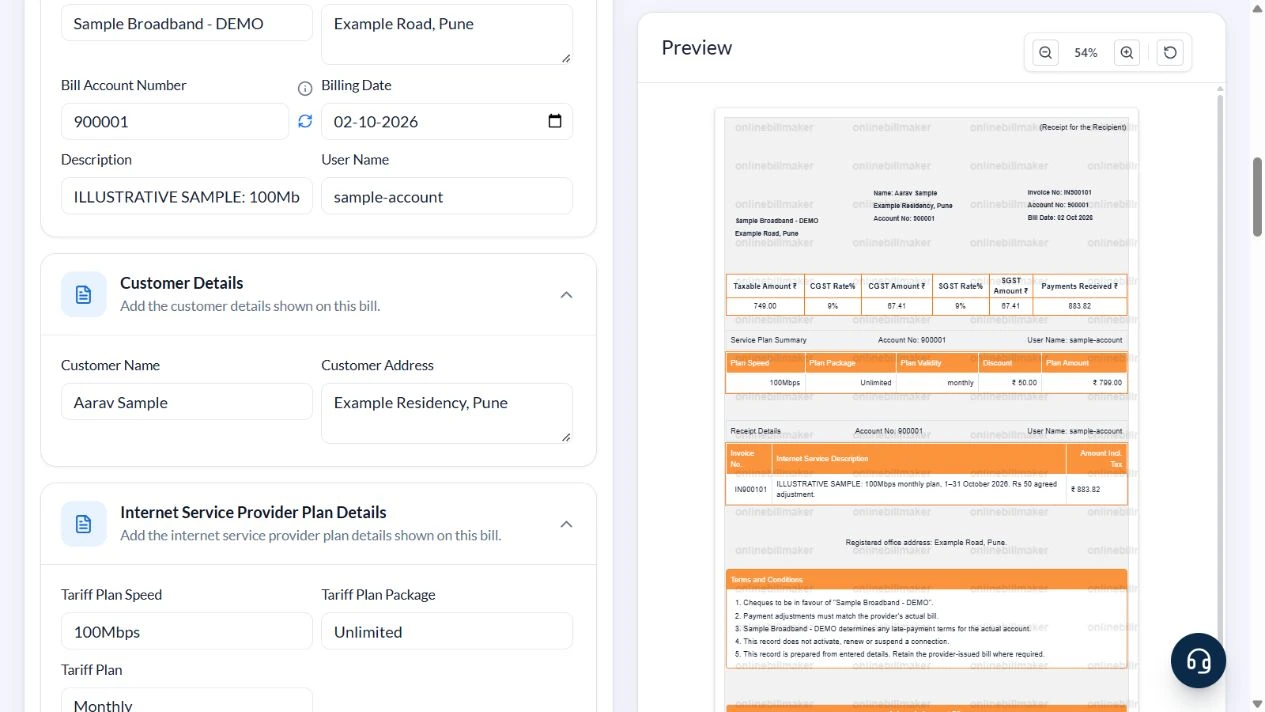
Select 100Mbps, Unlimited and Monthly. Enter Total Plan Amount 799, Discount Amount 50 and Invoice No 900101. Choose UPI. In Tax Details select CGST + SGST (Intrastate) and enter 18 solely for the example.
4. Reconcile the receipt and its period
The taxable value becomes ₹749, CGST and SGST are ₹67.41 each, and Payments Received is ₹883.82. Confirm IN900101, the entered provider address and the coverage dates in the service description. Keep the provider’s original bill if a recipient requires it.
5. Inspect the export stage
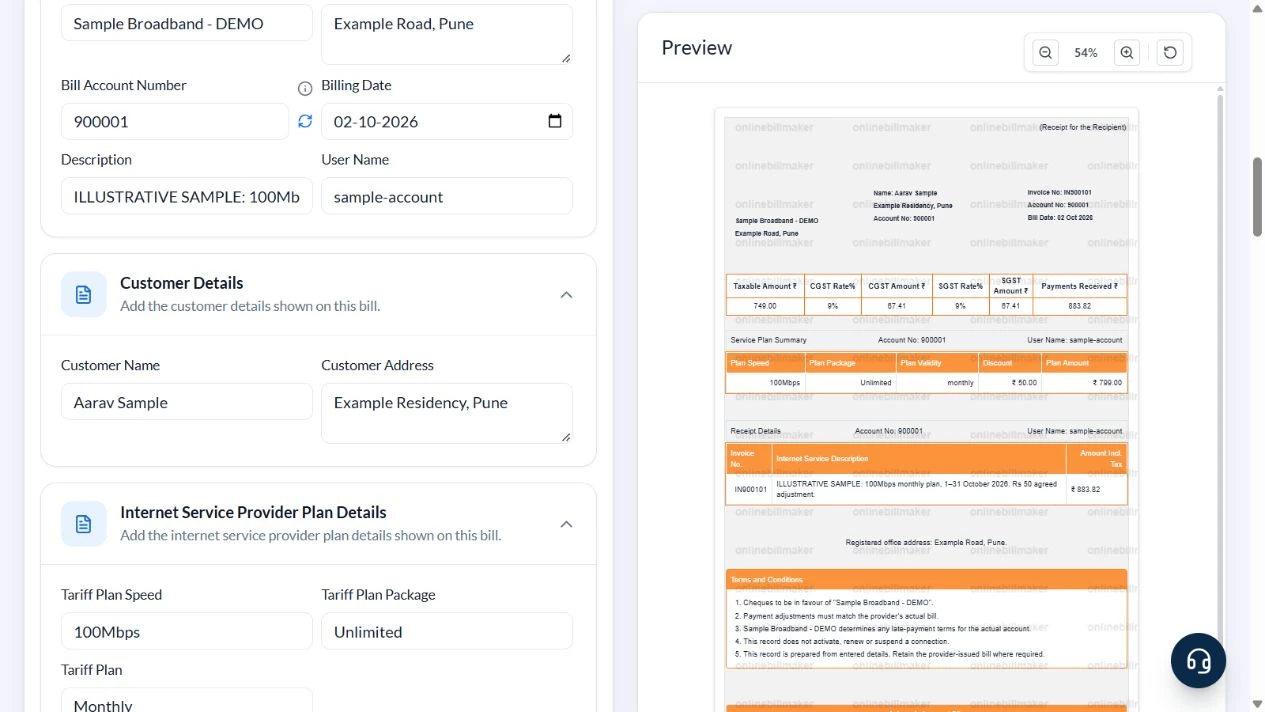
The PDF and image controls display their credit costs and are disabled before terms acceptance in this captured workflow. No paid access was purchased and no exported file was inspected.
After downloading: inspect the file before sharing
If you complete an eligible download, open the saved PDF or image and compare it with the preview. Check the first and last lines, long addresses, amounts, dates and any acknowledgement area. Confirm that every intended page is present and readable at the size the recipient will use. Keep the source record and payment evidence with the final file so the document can be reconciled later.
If you spot an error, return to the editor and correct the source field before generating the replacement. Use a clear file name with the document reference and period so an older draft is not accidentally sent as the final copy.
₹799 plan less ₹50 adjustment, plus assumed tax
| Item | Basis | Result |
|---|---|---|
| Plan amount | Entered pre-tax price | ₹799.00 |
| Discount | Agreed rupee adjustment | −₹50.00 |
| Taxable value | ₹799 − ₹50 | ₹749.00 |
| CGST | ₹749 × 9% | ₹67.41 |
| SGST | ₹749 × 9% | ₹67.41 |
| Total | ₹749 + ₹67.41 + ₹67.41 | ₹883.82 |
Do not enter an already tax-inclusive amount as the starting price and add tax again. A discount changes the taxable base in this layout. The example has no earlier balance or part-payment ledger; those must be reconciled against the actual account statement.
How should discounts and tax be reviewed?
For an internet bill with discount, confirm whether the reduction applies to the base plan amount and compare the resulting tax with the original. The broadband bill tax calculation in a worked example is an arithmetic explanation, not a determination of the provider’s treatment. Keep a one-time installation charge distinguishable from recurring service; only record it in the current layout if the description and amount remain clear.
Where should you obtain the original provider receipt?
For an Airtel broadband payment receipt or another provider-issued acknowledgement, use that provider’s authorised account or support channel. This independent editor cannot retrieve it. When preparing an internet reimbursement receipt, keep the issued bill and payment evidence together and check the employer’s requirements. A downloaded WiFi receipt records your entries; it does not authenticate them or establish eligibility for reimbursement.
Troubleshooting and final checks
- Confirm which layout is selected before following field names.
- A monthly label does not establish the exact covered dates; write them in Description for Template 2.
- Do not mistake Mbps for a data allowance: it is a speed unit.
- Check the entered provider address after changing templates.
- Do not label an unpaid charge Payments Received or treat a UPI label as verified payment.
Editing and previewing are free. Downloads require sign-in and either an active plan or enough purchased credits: 5 credits for a PDF and 1 credit for an image. There are no free download credits. Free users see the platform watermark in the preview. Signed-in users with a credit balance or an active plan can choose a download format and preview without the watermark. Compare download credits and plans.
This tool does not retrieve provider bills, measure service usage, verify payment or decide reimbursement acceptance.